The Microsoft Agent Framework represents a significant improvement in developer experience over the raw Foundry SDK. While the native SDK gives you complete control, the Agent Framework provides less boilerplate, type-safe tools, consistent patterns, and resource safety.
In my earlier post on Getting Started with Foundry Agents, I covered the basics of creating agents using the Azure AI Foundry Agents service and the azure-ai-projects SDK. In another article in this series, we looked at creating Azure AI agents with Microsoft Agent Framework (MAF). Agents created with MAF are local only where MAF acts as the runtime. In this follow-up, we will examine how to create Foundry agents using MAF.
When working directly with the native SDK, the typical pattern involves:
Creating an AIProjectClient
Defining an agent with PromptAgentDefinition
Managing conversations manually
Handling responses through the OpenAI client wrapper
While this approach gives you fine-grained control, it requires explicit conversation management and more boilerplate code. This is where the Microsoft Agent Framework comes into play. We have already seen the basics of MAF in an earlier article in this series. So, let’s look at the persistent agent pattern.
importosimportasynciofromdotenvimportload_dotenvfromtypingimportAnnotatedfromagent_framework.foundryimportFoundryChatClientfromazure.identity.aioimportAzureCliCredentialfrompydanticimportFieldload_dotenv()defget_weather(location:Annotated[str,Field(description="The location to get the weather for.")],)->str:importrequestsimportjsonapi_key=os.getenv("OPEN_WEATHERMAP_API_KEY")base_url="http://api.openweathermap.org/data/2.5/weather"complete_url=f"{base_url}?q={location}&appid={api_key}&units=metric"response=requests.get(complete_url)data=response.json()ifdata["cod"]!="404":main_data=data["main"]current_temperature=main_data["temp"]returnf"Temperature: {current_temperature}°C"else:return"City not found"asyncdefmain()->None:asyncwithAzureCliCredential()ascredential:asyncwithFoundryChatClient(credential=credential)aschat_client:agent=chat_client.as_agent(name="WeatherAgent",instructions="You are a weatherman. Provide accurate and concise weather information based on user queries. Use provided tools to fetch current weather data.",tools=get_weather,)result=awaitagent.run("What should I wear in Austin, Texas?")print(f"Agent: {result}")asyncio.run(main())
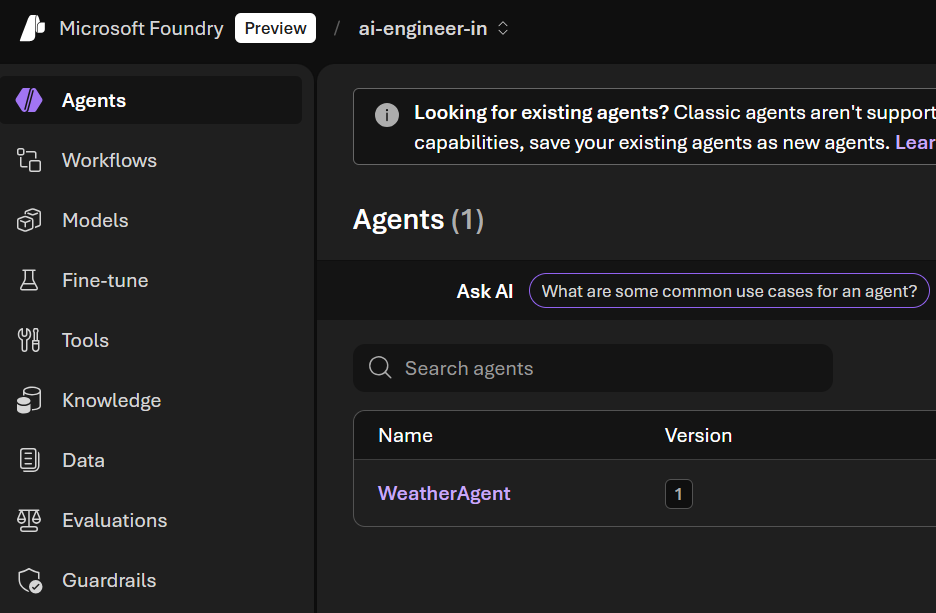
In both scenarios, an agent gets created in the Foundry.
As in the previous scenario, the agent is persisted in Foundry. We are using FoundryChatClient, which connects to a Foundry project and uses the model deployed there. The agent itself is constructed locally with chat_client.as_agent(...); Foundry holds the model and the conversation, and your application orchestrates the agent run.
In the subsequent parts of this series, we will examine other types of agents we can create with MAF.
ℹ️
Updated 27th April 2026 for breaking API changes. Microsoft Agent Framework’s Python package was reorganized in version 1.2.0. AzureAIClient (formerly in agent_framework.azure) is now FoundryChatClient in agent_framework.foundry. Chat clients use chat_client.as_agent(...) rather than chat_client.create_agent(...) to construct an agent. Code samples in this article have been updated to match the current SDK. See the client comparison article for the current client surface.
Share this article
Comments
Comments Require Consent
The comment system (Giscus) uses GitHub and may set authentication cookies.
Enable comments to join the discussion.
This site may load third-party content (comments, embeds) that could set cookies.
Learn more
Cookie Preferences
Control what third-party content is loaded. We use privacy-friendly analytics with no cookies.
Essential
ON
Required for the website to function. Cannot be disabled.
• Theme preference
• Privacy-friendly analytics
Comments
Giscus comment system (GitHub Discussions).
• Authentication cookies
• GitHub privacy policy
Embedded Content
Videos, code snippets, presentations.
• YouTube, Gists, SlideShare
• May set tracking cookies
Privacy First
No tracking cookies. Third-party content only loads with your consent. Preferences stored locally in your browser.
Comments
Comments Require Consent
The comment system (Giscus) uses GitHub and may set authentication cookies. Enable comments to join the discussion.