If you need a workflow that can adapt its routing decisions based on what agents discover during execution, look no further. Magentic is for you!
In this series on Microsoft Agent Framework (MAF), we’ve explored sequential workflows where agents process tasks in a fixed order, concurrent workflows where agents work in parallel, handoff workflows where agents transfer control based on context, and group chat workflows where agents engage in turn-based discussions. Each pattern has its strengths, but they all share one limitation: the orchestration logic is predetermined at design time.
What if you need a workflow that can adapt its routing decisions based on what agents discover during execution? Enter Magentic workflows, the most sophisticated orchestration pattern in MAF, where an LLM-powered manager autonomously coordinates specialized agents, making real-time decisions about who to invoke next based on intermediate results.
The Problem: Static Orchestration Isn’t Always Enough
Consider a complex task like investment due diligence. A sequential workflow might work: research the company, analyze financials, assess risks, write a report. But what happens when the risk assessment reveals concerning findings? In a static workflow, you’d proceed to the report anyway. In reality, you’d want to go back and dig deeper into those risks before making a recommendation.
This is where magentic workflows shine. They enable:
Dynamic routing: The manager decides which agent to invoke based on the current state of the conversation
Conditional branching: Different paths through the workflow based on intermediate results
Feedback loops: The ability to revisit earlier agents when new information warrants it
Autonomous coordination: The LLM manager handles the orchestration logic without explicit programming
What is a Magentic Workflow?
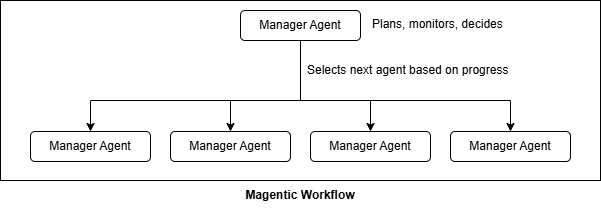
A magentic workflow consists of two key components:
Participant agents: Specialized agents, each with distinct tools and expertise
Manager agent: An LLM-powered orchestrator that plans the task, selects which agent to invoke, monitors progress, and determines when to complete or replan
Unlike group chat where agents take turns based on a selection function you define, magentic workflows delegate the entire orchestration decision to the manager LLM. The manager maintains a “task ledger” tracking facts discovered, the current plan, and progress toward completion.
Example: Investment Due Diligence Workflow
Let’s build a practical example that demonstrates the power of magentic orchestration. We’ll create an investment research workflow with four specialized agents:
Agent
Role
Tools
MarketResearcher
Gathers market context, news, analyst opinions
Web search, financial news
FinancialAnalyst
Analyzes fundamentals and financial health
Yahoo Finance API, Python
RiskAssessor
Evaluates risks and assigns a risk score
Risk assessment
InvestmentAdvisor
Synthesizes findings into a recommendation
Report generation
Here’s the key feature. If the RiskAssessor returns a high risk score (>7), the manager will loop back to the MarketResearcher for deeper investigation before proceeding to the final recommendation.
Each agent needs specialized tools. Let’s start with the research and analysis tools:
1
2
3
4
5
6
7
8
9
10
11
12
13
14
15
16
17
18
19
fromagent_frameworkimportai_functionfromtavilyimportTavilyClientimportyfinanceasyfimportostavily_client=TavilyClient(api_key=os.getenv("TAVILY_API_KEY"))@ai_functiondefsearch_web(query:str)->str:"""Search the web for general information about markets, companies, or trends."""result=tavily_client.search(query=query,max_results=5)returnstr(result)@ai_functiondefsearch_financial_news(company_or_topic:str)->str:"""Search for recent financial news, analyst opinions, and market sentiment."""query=f"{company_or_topic} stock news analyst rating 2024"result=tavily_client.search(query=query,max_results=5)returnf"FINANCIAL NEWS for {company_or_topic}:\n{str(result)}"
The financial analysis tool uses Yahoo Finance to fetch real market data:
@ai_functiondefanalyze_financials(ticker:str)->str:"""Get key financial metrics using Yahoo Finance."""try:stock=yf.Ticker(ticker.upper())info=stock.infoname=info.get('longName',ticker)price=info.get('currentPrice','N/A')pe_ratio=info.get('trailingPE','N/A')profit_margin=info.get('profitMargins','N/A')market_cap=info.get('marketCap','N/A')# Format market capifisinstance(market_cap,(int,float)):ifmarket_cap>=1e12:market_cap=f"${market_cap/1e12:.2f}T"elifmarket_cap>=1e9:market_cap=f"${market_cap/1e9:.2f}B"result=f"""FINANCIAL ANALYSIS for {name} ({ticker.upper()})
{'='*50}- Current Price: ${price}- Market Cap: {market_cap}- P/E Ratio: {pe_ratio}- Profit Margin: {profit_margin*100:.1f}% if profit_margin else 'N/A'
"""# Add risk flags for unprofitable companiesifprofit_marginandprofit_margin<0:result+="\nRISK FLAG: Company is UNPROFITABLE (negative margins)"returnresultexceptExceptionase:returnf"Error fetching data for {ticker}: {str(e)}"
The risk assessment tool is where the conditional logic lives:
fromagent_framework.azureimportAzureOpenAIChatClientfromazure.identityimportDefaultAzureCredentialchat_client=AzureOpenAIChatClient(credential=DefaultAzureCredential(),)# Market Researcher - gathers context and newsmarket_researcher=chat_client.create_agent(name="MarketResearcher",instructions="""You are a market research analyst.
YOUR ROLE:
- Gather market context, industry trends, and competitive landscape
- Find recent news and analyst opinions
- Identify market sentiment and catalysts
Use search_web for broad context and search_financial_news for recent analyst takes.
If asked to do a "deep dive" on specific risks, focus your search on those factors.""",tools=[search_web,search_financial_news],)# Financial Analyst - evaluates fundamentalsfinancial_analyst=chat_client.create_agent(name="FinancialAnalyst",instructions="""You are a financial analyst specializing in fundamental analysis.
YOUR ROLE:
- Analyze financial metrics (P/E, margins, growth, debt)
- Evaluate company fundamentals and financial health
- Be objective about both strengths and weaknesses""",tools=[analyze_financials],)# Risk Assessor - identifies and scores risksrisk_assessor=chat_client.create_agent(name="RiskAssessor",instructions="""You are a risk management specialist.
YOUR ROLE:
- Evaluate investment risks based on gathered information
- Assign a risk score from 1-10
- Identify specific risk factors
CRITICAL: If risk score > 7, recommend deeper research before final recommendation.""",tools=[assess_risk],)# Investment Advisor - synthesizes final recommendationinvestment_advisor=chat_client.create_agent(name="InvestmentAdvisor",instructions="""You are a senior investment advisor.
THIS IS THE FINAL STEP - After you complete your work, the task is DONE.
YOUR ROLE:
- Synthesize all research into a recommendation: BUY / HOLD / SELL / AVOID
- Save the final report using save_report tool
- After saving, confirm "TASK COMPLETE - Report saved successfully" """,tools=[save_report],)
Creating the Manager Agent
The manager agent is the brain of the magentic workflow. Its instructions define how agents are coordinated:
manager_agent=chat_client.create_agent(name="InvestmentManager",instructions="""You are the Investment Due Diligence Manager.
YOUR TEAM:
- MarketResearcher: Gathers market context, news, analyst opinions
- FinancialAnalyst: Analyzes fundamentals, metrics, financial health
- RiskAssessor: Evaluates risks, assigns risk score (1-10)
- InvestmentAdvisor: Synthesizes findings and saves final report
WORKFLOW:
1. MarketResearcher - gather market context and news
2. FinancialAnalyst - analyze fundamentals
3. RiskAssessor - evaluate risks and get risk score
4. DECISION POINT (if risk score > 7):
- Request ONE deep dive from MarketResearcher on the main risk
- Then proceed to step 5
5. InvestmentAdvisor - synthesize and save final report
TERMINATION:
- The task is COMPLETE when InvestmentAdvisor confirms "Report saved"
- Do NOT call any more agents after InvestmentAdvisor completes""")
Notice how the manager’s instructions encode the conditional logic: “if risk score > 7, request ONE deep dive.” This is the power of magentic. The routing logic is expressed in natural language and interpreted by the LLM.
Building the Workflow
With all components defined, we build the magentic workflow using MagenticBuilder:
 1
 2
 3
 4
 5
 6
 7
 8
 9
10
11
12
13
14
15
16
17
fromagent_frameworkimportMagenticBuilderworkflow=(MagenticBuilder().participants(market_researcher=market_researcher,financial_analyst=financial_analyst,risk_assessor=risk_assessor,investment_advisor=investment_advisor,).with_standard_manager(agent=manager_agent,max_round_count=15,# Maximum orchestration roundsmax_stall_count=3,# Replan after this many stalls).build())
Key configuration options:
max_round_count: Limits total orchestration rounds to prevent infinite loops
max_stall_count: If no progress is made for this many rounds, the manager replans
Running and Monitoring the Workflow
Execute the workflow and observe the orchestration events:
Notice the feedback loop: after the risk assessor returns a high score, the manager autonomously decides to invoke the market researcher again for deeper research on the identified risks. This adaptive behavior is impossible with static workflow patterns.
Compare this to a low-risk stock like Microsoft (MSFT), where the workflow proceeds directly without the feedback loop:
The same workflow code produces different execution paths based on the data discovered during execution.
How Magentic Differs from Other Patterns
Pattern
Orchestration
Routing Logic
Use Case
Sequential
Fixed order
Predetermined
Pipelines with known steps
Concurrent
Parallel execution
Fan-out/fan-in
Independent subtasks
Handoff
Agent-to-agent transfer
Explicit handoff calls
Escalation, specialization
Group Chat
Turn-based
Selection function
Brainstorming, debate
Magentic
LLM manager
Dynamic, adaptive
Complex tasks with conditional logic
Magentic is the most flexible but also the most resource-intensive pattern. The manager LLM is invoked between every agent execution to evaluate progress and decide the next step. Use it when:
The workflow requires conditional branching based on intermediate results
You need feedback loops for iterative refinement
The optimal sequence of agents isn’t known at design time
Task complexity warrants the overhead of LLM-based orchestration
Magentic workflows represent the most sophisticated orchestration pattern in MAF, bridging the gap between rigid automation and truly autonomous multi-agent systems. When your task requires adaptive decision-making that can’t be predetermined, magentic is the pattern to reach for.
Share this article
Comments
Comments Require Consent
The comment system (Giscus) uses GitHub and may set authentication cookies.
Enable comments to join the discussion.
This site may load third-party content (comments, embeds) that could set cookies.
Learn more
Cookie Preferences
Control what third-party content is loaded. We use privacy-friendly analytics with no cookies.
Essential
ON
Required for the website to function. Cannot be disabled.
• Theme preference
• Privacy-friendly analytics
Comments
Giscus comment system (GitHub Discussions).
• Authentication cookies
• GitHub privacy policy
Embedded Content
Videos, code snippets, presentations.
• YouTube, Gists, SlideShare
• May set tracking cookies
Privacy First
No tracking cookies. Third-party content only loads with your consent. Preferences stored locally in your browser.
Comments
Comments Require Consent
The comment system (Giscus) uses GitHub and may set authentication cookies. Enable comments to join the discussion.