Learn how to orchestrate AI agents in a concurrent workflow using Microsoft Agent Framework's ConcurrentBuilder
In the [previous article](Sequential workflows in Microsoft Agent Framework | Ravikanth Chaganti), we explored the sequential workflow pattern, a straightforward approach where agents process tasks one after another in a defined order. While sequential workflows are powerful for pipeline-style processing, they have a limitation: speed. When agents don’t depend on each other’s output, running them one at a time is inefficient.
Here’s where the concurrent workflow pattern comes into play. This pattern allows multiple agents to work in parallel, dramatically reducing total execution time and enabling scenarios that require diverse perspectives to be analyzed simultaneously.
In this article, we’ll build up from a simple example to a sophisticated multi-analyst system that gathers insights from different perspectives and synthesizes them into a unified executive summary.
The concurrent pattern is useful in scenarios such as:
Independent analysis: Multiple agents can analyze the same input without needing each other’s results.
Time-sensitive operations: You need results fast, and parallelism can speed things up.
Diverse perspectives: You want varied viewpoints on the same topic (technical, business, ethical, and so on).
Redundancy/voting: Multiple agents tackle the same problem, and you aggregate their answers.
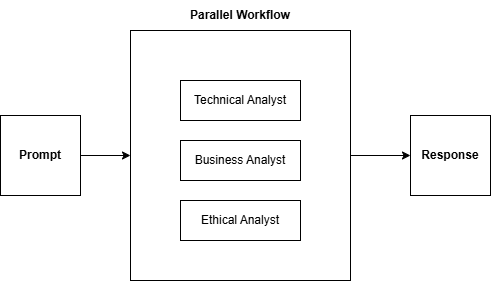
Let us explore this further using an example. In this example, we will create three analyst agents that analyze a topic across three facets: technical, business, and ethical.
fromagent_frameworkimport(ConcurrentBuilder,WorkflowOutputEvent,ExecutorInvokedEvent,ExecutorCompletedEvent,WorkflowStatusEvent,WorkflowRunState,)fromagent_framework.azureimportAzureOpenAIChatClientfromazure.identityimportDefaultAzureCredentialimportasynciofromdotenvimportload_dotenvload_dotenv()# Create chat clientchat_client=AzureOpenAIChatClient(credential=DefaultAzureCredential(),)# Create three specialized analyst agentstechnical_analyst=chat_client.create_agent(name="TechnicalAnalyst",instructions="Analyze the topic from a technical/engineering perspective. Be concise.",)business_analyst=chat_client.create_agent(name="BusinessAnalyst",instructions="Analyze the topic from a business/market perspective. Be concise.",)ethical_analyst=chat_client.create_agent(name="EthicalAnalyst",instructions="Analyze the topic from an ethical/societal perspective. Be concise.",)# Build the concurrent workflowworkflow=(ConcurrentBuilder().participants([technical_analyst,business_analyst,ethical_analyst]).build())asyncdefmain():print("Running concurrent analysis with 3 analysts...")print("="*60)asyncforeventinworkflow.run_stream("Analyze the impact of autonomous vehicles"):ifisinstance(event,ExecutorInvokedEvent):print(f"⚡ Starting: {event.executor_id}")elifisinstance(event,ExecutorCompletedEvent):print(f"✓ Completed: {event.executor_id}")elifisinstance(event,WorkflowStatusEvent):ifevent.state==WorkflowRunState.IDLE:print("\n✅ Workflow completed!")elifisinstance(event,WorkflowOutputEvent):print(f"\n{'='*60}")print("RESULTS")print(f"{'='*60}")formsginevent.data:name=msg.author_nameor"Assistant"print(f"\n--- {name} ---")print(msg.text)if__name__=="__main__":asyncio.run(main())
In this concurrent workflow, three agents are created, each with a different analytical perspective. ConcurrentBuilder creates a workflow that runs all participants in parallel. All three agents receive the same input: Analyze the impact of autonomous vehicles. They execute simultaneously, returning results as they complete.
The ConcurrentBuilder is a fluent builder pattern for constructing concurrent workflows:
1
2
3
4
5
workflow=(ConcurrentBuilder().participants([agent1,agent2,agent3])# Agents to run in parallel.build()# Finalize and return the workflow)
Unlike SequentialBuilder, where agents run one after another, passing output forward, ConcurrentBuilder fans out the input to all participants simultaneously.
With the help of events, we can track the progress of the agents as they complete.
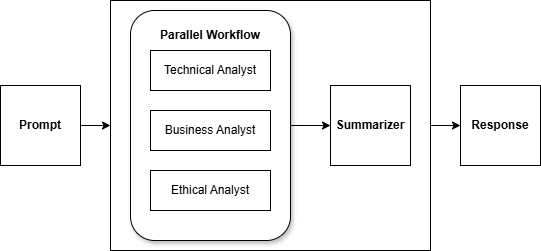
So far, we have received individual responses from each agent. But what if we want to combine their insights into a unified summary? This is where aggregators come in.
We can extend this workflow by adding an aggregator. It would be nice if another agent could take the response from the parallel workflow and summarize it for us.
Building a custom aggregator function
An aggregator is an async function that receives all agent responses and produces a combined output.
fromagent_frameworkimportAgentExecutorResponse,ChatMessage,Role# Create a summarizer agent to synthesize resultssummarizer=chat_client.create_agent(name="Summarizer",instructions="""You are an expert synthesizer. You will receive analyses from three perspectives:
- Technical/Engineering
- Business/Market
- Ethical/Societal
Create a unified executive summary that:
1. Highlights key insights from each perspective
2. Identifies common themes
3. Notes tensions or trade-offs
4. Provides actionable recommendations
Keep the summary concise but comprehensive.""",)asyncdefaggregate_with_summarizer(results:list[AgentExecutorResponse])->str:"""Aggregate all analyst responses using the summarizer agent."""# Step 1: Collect all analysesanalyses=[]forrinresults:agent_name=r.executor_id# Get the last assistant message (the analysis)formsginreversed(r.agent_run_response.messages):ifmsg.role.value=="assistant":analyses.append(f"## {agent_name} Analysis\n{msg.text}")break# Step 2: Create prompt for summarizercombined="\n\n---\n\n".join(analyses)prompt=f"Please synthesize the following three analyses into a unified executive summary:\n\n{combined}"# Step 3: Run summarizer agentresponse=awaitsummarizer.run([ChatMessage(role=Role.USER,text=prompt)])returnresponse.text
This aggregator function can be used with ConcurrentBuilder().
fromagent_frameworkimport(ConcurrentBuilder,AgentExecutorResponse,ChatMessage,Role,WorkflowOutputEvent,ExecutorInvokedEvent,ExecutorCompletedEvent,WorkflowStatusEvent,WorkflowRunState,)fromagent_framework.azureimportAzureOpenAIChatClientfromazure.identityimportDefaultAzureCredentialimportasynciofromdotenvimportload_dotenvload_dotenv()# Create chat clientchat_client=AzureOpenAIChatClient(credential=DefaultAzureCredential(),)# Create agents with different perspectivestechnical_analyst=chat_client.create_agent(name="TechnicalAnalyst",instructions="Analyze the topic from a technical/engineering perspective. Be concise.",)business_analyst=chat_client.create_agent(name="BusinessAnalyst",instructions="Analyze the topic from a business/market perspective. Be concise.",)ethical_analyst=chat_client.create_agent(name="EthicalAnalyst",instructions="Analyze the topic from an ethical/societal perspective. Be concise.",)# Create aggregator/summarizer agentsummarizer=chat_client.create_agent(name="Summarizer",instructions="""You are an expert synthesizer. You will receive analyses from three different perspectives:
- Technical/Engineering
- Business/Market
- Ethical/Societal
Your job is to create a unified executive summary that:
1. Highlights the key insights from each perspective
2. Identifies common themes across all analyses
3. Notes any tensions or trade-offs between perspectives
4. Provides actionable recommendations
Keep the summary concise but comprehensive.""",)# Custom aggregator function that uses the summarizer agentasyncdefaggregate_with_summarizer(results:list[AgentExecutorResponse])->str:"""Aggregate all analyst responses using the summarizer agent."""# Collect all analysesanalyses=[]forrinresults:agent_name=r.executor_id# Get the last assistant message (the analysis)formsginreversed(r.agent_run_response.messages):ifmsg.role.value=="assistant":analyses.append(f"## {agent_name} Analysis\n{msg.text}")break# Create prompt for summarizercombined="\n\n---\n\n".join(analyses)prompt=f"Please synthesize the following three analyses into a unified executive summary:\n\n{combined}"# Run summarizer agentresponse=awaitsummarizer.run([ChatMessage(role=Role.USER,text=prompt)])returnresponse.text# Build concurrent workflow with custom aggregatorworkflow=(ConcurrentBuilder().participants([technical_analyst,business_analyst,ethical_analyst]).with_aggregator(aggregate_with_summarizer).build())asyncdefmain():# Run the workflow with streaming eventsprint("Running concurrent analysis with 3 analysts + summarizer...")print("="*60)output_evt:WorkflowOutputEvent|None=Noneasyncforeventinworkflow.run_stream("Analyze the impact of autonomous vehicles"):ifisinstance(event,ExecutorInvokedEvent):print(f"⚡ Starting: {event.executor_id}")elifisinstance(event,ExecutorCompletedEvent):print(f"✓ Completed: {event.executor_id}")elifisinstance(event,WorkflowStatusEvent):ifevent.state==WorkflowRunState.IDLE:print("\n✅ Workflow completed!")elifisinstance(event,WorkflowOutputEvent):output_evt=event# Display the aggregated summaryifoutput_evt:print(f"\n{'='*60}")print("EXECUTIVE SUMMARY (Aggregated by Summarizer Agent)")print(f"{'='*60}")print(output_evt.data)if__name__=="__main__":asyncio.run(main())
The design of an aggregator is important. Consider the following for designing a meaningful aggregator.
What insights should be preserved from each agent?
How should conflicts between perspectives be handled?
What format does the final output need to be in?
Agents in a concurrent workflow may complete at different speeds. The concurrent workflow waits for all to finish before aggregating. If you need partial results, consider using the events to track individual completions.
In the next article, we’ll explore the handoff workflow pattern, in which agents can dynamically transfer control to each other based on the conversation context. This is perfect for scenarios like customer support, where a coordinator routes requests to specialized agents. Stay tuned!
Share this article
Comments
Comments Require Consent
The comment system (Giscus) uses GitHub and may set authentication cookies.
Enable comments to join the discussion.
This site may load third-party content (comments, embeds) that could set cookies.
Learn more
Cookie Preferences
Control what third-party content is loaded. We use privacy-friendly analytics with no cookies.
Essential
ON
Required for the website to function. Cannot be disabled.
• Theme preference
• Privacy-friendly analytics
Comments
Giscus comment system (GitHub Discussions).
• Authentication cookies
• GitHub privacy policy
Embedded Content
Videos, code snippets, presentations.
• YouTube, Gists, SlideShare
• May set tracking cookies
Privacy First
No tracking cookies. Third-party content only loads with your consent. Preferences stored locally in your browser.
Comments
Comments Require Consent
The comment system (Giscus) uses GitHub and may set authentication cookies. Enable comments to join the discussion.