Learn how to orchestrate AI agents in a step-by-step pipeline using Microsoft Agent Framework's SequentialBuilder
A single AI agent is powerful and can do impressive things. But real-world applications often need multiple specialists working together, with each agent handling a specific task before passing results to the next. As with humans, in the agentic world we also need to break complex problems into manageable pieces and have specialized agents handle each task. We need one agent to review another’s work and handle complex tool invocation.
Trying to cram all of this into one agent leads to:
Confused outputs (the agent doesn’t know which “hat” to wear)
Context overload (too many tools and instructions)
Difficult debugging (hard to know what went wrong)
Microsoft Agent Framework (MAF) makes this orchestration simple with its workflow patterns. Workflows in MAF connect multiple agents (and other executors) into a graph that defines how data flows between them. Think of it as the “plumbing” that connects your agents together. In this article, we’ll focus on the most fundamental pattern: Sequential Workflows.
Sequential Workflows
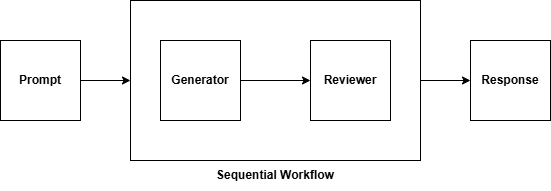
The Sequential Pattern is the simplest and most intuitive workflow pattern. Agents process data sequentially, each building on the previous agent’s output.
In a sequential flow, each agent receives the accumulated conversation history (including all previous messages), processes the input, generates a response, appends it to the conversation, and passes the updated conversation to the next agent. These workflows are perfect for content pipelines (research → write → edit → publish), data transformation chains (extract → transform → load), review processes (draft → review → approve), and step-by-step analysis (collect data → analyze → summarize).
Building a Sequential Workflow: Step by Step
Let’s build a content creation pipeline that demonstrates the sequential pattern. We’ll start simple and gradually add complexity.
The DefaultAzureCredential handles authentication automatically. It tries multiple authentication methods in order:
Environment variables
Managed Identity
Azure CLI (az login)
Now let’s create three specialized agents for our content pipeline:
1
2
3
4
5
6
7
8
9
10
11
12
13
14
researcher=chat_client.create_agent(name="Researcher",instructions="Research the given topic and provide key facts and statistics.",)writer=chat_client.create_agent(name="Writer",instructions="Take the research and write an engaging article draft.",)editor=chat_client.create_agent(name="Editor",instructions="Review the draft for clarity, grammar, and engagement. Provide the final version.",)
A sequential workflow is created using the SequentialBuilder().
.participants([...])- List your agents in the order they should execute.
.build()- Construct the workflow.
Under the hood, this creates:
An executor for each agent
Edges connecting them in sequence
A start point (first agent) and an end point (last agent)
Running the Workflow with Streaming
MAF supports real-time event streaming during workflow execution. This gives you visibility into what’s happening:
1
2
3
4
5
6
7
8
9
10
11
12
13
14
15
16
17
asyncdefmain():# Run the workflow with streaming eventsprint("Running sequential workflow: Researcher → Writer → Editor")print("="*60)output_evt:WorkflowOutputEvent|None=Noneasyncforeventinworkflow.run_stream("Write about the future of AI agents"):ifisinstance(event,ExecutorInvokedEvent):print(f"⚡ Starting: {event.executor_id}")elifisinstance(event,ExecutorCompletedEvent):print(f"✓ Completed: {event.executor_id}")elifisinstance(event,WorkflowStatusEvent):ifevent.state==WorkflowRunState.IDLE:print("\n✅ Workflow completed!")elifisinstance(event,WorkflowOutputEvent):output_evt=event
Let’s understand each event type:
Event
When It Fires
What It Contains
ExecutorInvokedEvent
When an agent starts processing
executor_id - the agent’s name
ExecutorCompletedEvent
When an agent finishes
executor_id
WorkflowStatusEvent
When the workflow state changes
state - RUNNING, IDLE, ERROR
WorkflowOutputEvent
When the workflow produces output
data - the final result
The final output contains the complete conversation history.
1
2
3
4
5
6
7
8
9
10
11
12
13
14
15
# Display the final conversationifoutput_evt:print("\n"+"="*60)print("FINAL CONVERSATION")print("="*60)messages:list[ChatMessage]|Any=output_evt.datafori,msginenumerate(messages,start=1):name=msg.author_nameor("assistant"ifmsg.role==Role.ASSISTANTelse"user")print(f"\n{'-'*60}")print(f"{i:02d} [{name}]")print(f"{'-'*60}")print(msg.text)if__name__=="__main__":asyncio.run(main())
The WorkflowOutputEvent.data contains a list of ChatMessage objects with:
role: USER or ASSISTANT
author_name: The agent’s name (for assistant messages)
fromagent_frameworkimport(SequentialBuilder,ChatMessage,Role,WorkflowOutputEvent,ExecutorInvokedEvent,ExecutorCompletedEvent,WorkflowStatusEvent,WorkflowRunState,)fromagent_framework.azureimportAzureOpenAIChatClientfromazure.identityimportDefaultAzureCredentialimportasynciofromtypingimportAnyfromdotenvimportload_dotenvload_dotenv()# Create chat clientchat_client=AzureOpenAIChatClient(credential=DefaultAzureCredential(),)# Create specialized agentsresearcher=chat_client.create_agent(name="Researcher",instructions="Research the given topic and provide key facts and statistics.",)writer=chat_client.create_agent(name="Writer",instructions="Take the research and write an engaging article draft.",)editor=chat_client.create_agent(name="Editor",instructions="Review the draft for clarity, grammar, and engagement. Provide the final version.",)asyncdefmain():# Build sequential workflowworkflow=(SequentialBuilder().participants([researcher,writer,editor]).build())# Run the workflow with streaming eventsprint("Running sequential workflow: Researcher → Writer → Editor")print("="*60)output_evt:WorkflowOutputEvent|None=Noneasyncforeventinworkflow.run_stream("Write about the future of AI agents"):ifisinstance(event,ExecutorInvokedEvent):print(f"⚡ Starting: {event.executor_id}")elifisinstance(event,ExecutorCompletedEvent):print(f"✓ Completed: {event.executor_id}")elifisinstance(event,WorkflowStatusEvent):ifevent.state==WorkflowRunState.IDLE:print("\n✅ Workflow completed!")elifisinstance(event,WorkflowOutputEvent):output_evt=event# Display the final conversationifoutput_evt:print("\n"+"="*60)print("FINAL CONVERSATION")print("="*60)messages:list[ChatMessage]|Any=output_evt.datafori,msginenumerate(messages,start=1):name=msg.author_nameor("assistant"ifmsg.role==Role.ASSISTANTelse"user")print(f"\n{'-'*60}")print(f"{i:02d} [{name}]")print(f"{'-'*60}")print(msg.text)if__name__=="__main__":asyncio.run(main())
When you run this workflow, you’ll see something like:
Running sequential workflow: Researcher → Writer → Editor============================================================⚡ Starting: Researcher
✓ Completed: Researcher
⚡ Starting: Writer
✓ Completed: Writer
⚡ Starting: Editor
✓ Completed: Editor
✅ Workflow completed!
============================================================FINAL CONVERSATION============================================================------------------------------------------------------------
01[user]------------------------------------------------------------
Write about the future of AI agents
------------------------------------------------------------
02[Researcher]------------------------------------------------------------
# Key Facts and Statistics on AI Agents## Market Growth- The AI agent market is projected to reach $47.1 billion by 2030- Autonomous AI systems are expected to handle 85% of customer interactions by 2027...
------------------------------------------------------------
03[Writer]------------------------------------------------------------
# The Future of AI Agents: A New Era of Intelligent AutomationThe rise of AI agents represents one of the most transformative shifts...
[Engaging article draft based on the research]------------------------------------------------------------
04[Editor]------------------------------------------------------------
# The Future of AI Agents: Reshaping How We Work and Live....
Sequential workflows in MAF provide a simple yet powerful way to orchestrate multiple AI agents. With just a few lines of code, you can create sophisticated pipelines where:
Each agent specializes in one task
Data flows naturally from one agent to the next
You have full visibility through event streaming
The framework handles all the orchestration complexity
The SequentialBuilder makes this pattern incredibly easy to implement. You just define your agents, list them in order, and let MAF handle the rest.
Share this article
Comments
Comments Require Consent
The comment system (Giscus) uses GitHub and may set authentication cookies.
Enable comments to join the discussion.
This site may load third-party content (comments, embeds) that could set cookies.
Learn more
Cookie Preferences
Control what third-party content is loaded. We use privacy-friendly analytics with no cookies.
Essential
ON
Required for the website to function. Cannot be disabled.
• Theme preference
• Privacy-friendly analytics
Comments
Giscus comment system (GitHub Discussions).
• Authentication cookies
• GitHub privacy policy
Embedded Content
Videos, code snippets, presentations.
• YouTube, Gists, SlideShare
• May set tracking cookies
Privacy First
No tracking cookies. Third-party content only loads with your consent. Preferences stored locally in your browser.
Comments
Comments Require Consent
The comment system (Giscus) uses GitHub and may set authentication cookies. Enable comments to join the discussion.