Callbacks are user-defined functions that hook into an agent's execution pipeline at predefined checkpoints. They let you observe, customize, and control agent behavior without modifying the ADK framework code.
Imagine you built a customer support agent. It works well, but you then discover that the LLM occasionally leaks email addresses in its responses. You need to sanitize output before the user sees it. Or consider a flight booking agent where only admin users should be allowed to cancel reservations. You need to check permissions before a tool executes. Or maybe the same question is asked a hundred times a day, and each time you are paying for an LLM API call. You need to return cached responses and skip the model entirely. All of these share a common pattern. You need to run your code at specific points in the agent’s execution pipeline, before or after the model call, before or after a tool runs, before or after the agent itself. This is where the callbacks feature comes into play.
Callbacks
Callbacks are user-defined functions that hook into an agent’s execution pipeline at predefined checkpoints. You define them, attach them to an agent at creation time, and ADK calls them automatically at key stages. They let you observe, customize, and control behavior without modifying any ADK framework code. Think of them as checkpoints during the agent’s process.
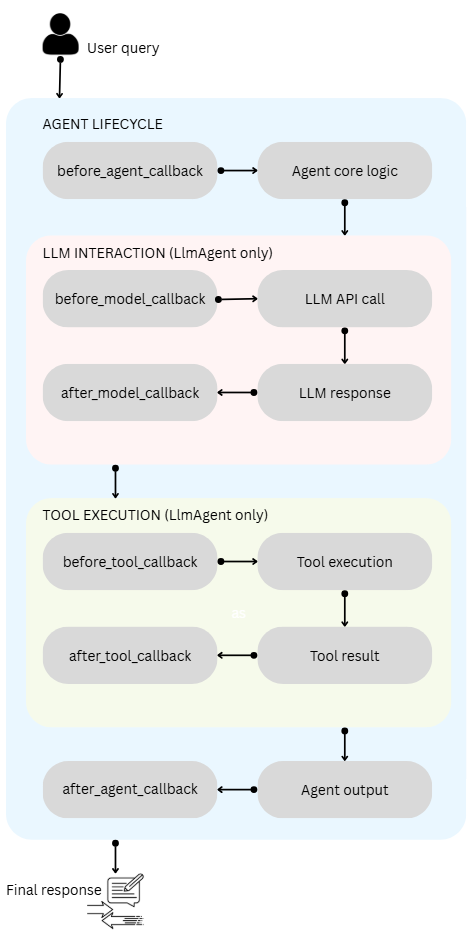
The core mental model is a pipeline with six interception points grouped into three pairs.
The agent lifecycle pair (before_agent_callback and after_agent_callback) wraps the entire agent execution.
The model interaction pair (before_model_callback and after_model_callback) wraps the LLM API call.
The tool execution pair (before_tool_callback and after_tool_callback) wraps each tool invocation.
Every before_* callback acts as a gatekeeper. These callbacks return None to proceed to the next step, or return a specific object to skip the step and use that object as the output instead.
Every after_* callback acts as a post-processor. Return None to pass through the original result, or return a specific object to replace it.
These agent lifecycle callbacks are available on all agent types (BaseAgent, LlmAgent, SequentialAgent, ParallelAgent, LoopAgent). The model and tool callbacks are specific to LlmAgent. These callbacks are normal Python functions with specific parameters and return types.
Agent lifecycle callbacks
The agent lifecycle callbacks are available before the agent starts work and after it finishes.
The before_agent_callback is useful for setting up the environment needed for the agent’s run. You can use this callback validate session state or even modify the invocation context before the agent’s core logic starts.
The Runner invokes this function and provides a CallbackContext object as input. This object contains information about the agent’s current execution state, session state, and other references such as artifacts and memory.
The after_agent_callback is useful for cleaning up after the agent run, performing post-execution checks, or modifying or augmenting the agent’s final output.
The model interaction callbacks are specific to LlmAgent and wrap the LLM API calls.
The before_model_callback is useful when you want to inspect or modify the request to the LLM API. For example, you can implement use cases such as adding a few-shot examples to the prompt sent to the LLM, implementing input guardrails, etc.
The LlmRequest parameter is mutable. You can modify it in-place to change what the LLM receives.
The after_model_callback is useful when you want to inspect or modify LLM generated response. With this callback, you can implement response reformatting, such as removing sensitive information.
The LlmResponse object in the after_model_callback contains LLM generated response. Both agent lifecycle and model interaction callback pairs receive CallbackContext as input.
Tool execution callbacks
The tool_execution_callback is also specific to LlmAgent and wraps each individual tool invocation that the LLM might request.
The before_tool_callback is useful when you want to determine whether tool execution should be allowed, inspect or modify tool arguments, or implement tool-level caching.
The args parameter is mutable. We can modify it in-place to change what the tool receives, then return None to invoke the tool with the modified arguments.
The after_tool_callback is useful for scenarios such as inspecting or modifying tool output before sending it to the LLM, and for logging tool results.
As seen so far, every callback receives a context object that provides access to the agent’s session state, artifacts, and invocation metadata. There are two types of context, and understanding them is essential.
CallbackContext
CallbackContext is used in agent lifecycle and model interaction callbacks. It provides access to the agent name, the invocation ID, and the session state.
1
2
3
4
5
6
7
8
9
10
11
12
13
14
fromgoogle.adk.agents.callback_contextimportCallbackContext# Properties available:callback_context.agent_name# Name of the current agentcallback_context.invocation_id# Unique ID for this invocationcallback_context.state# Session state (read/write)# State modifications are automatically trackedcallback_context.state["my_key"]="my_value"current=callback_context.state.get("my_key","default")# Artifact operations:version=callback_context.save_artifact("filename.txt",types.Part(text="content"))part=callback_context.load_artifact("filename.txt")
When you write callback_context.state["key"] = value, the framework automatically captures this into EventActions.state_delta, which the SessionService processes via append_event. This is the same mechanism described in the article on sessions, state, and memory. You never need to manually construct events or call append_event inside callbacks.
ToolContext
ToolContext is used in tool callbacks. It extends CallbackContext with tool-specific capabilities.
1
2
3
4
5
6
7
8
9
10
11
12
13
14
15
16
fromgoogle.adk.tools.tool_contextimportToolContext# Everything from CallbackContext PLUS:tool_context.function_call_id# ID linking to the LLM's function calltool_context.actions# Direct access to EventActions# Authentication:tool_context.request_credential(auth_config)# Trigger OAuth flowtool_context.get_auth_response(auth_config)# Retrieve credentials# Memory & Artifacts:results=tool_context.search_memory("query")# Search memory serviceartifacts=tool_context.list_artifacts()# List available artifacts# Summarization control:tool_context.actions.skip_summarization=True# Skip LLM summarization of tool result
State prefixes in callbacks
State keys in callbacks use the same prefix scoping system described in the sessions, state, and memory article.
1
2
3
4
5
6
7
8
9
10
11
# Application-wide state (shared across all users/sessions)callback_context.state["app:global_config"]={"max_retries":3}# User-specific state (shared across sessions for this user)callback_context.state["user:preferences"]={"language":"es"}# Temporary state (cleared between invocations)callback_context.state["temp:current_step"]="processing"# No prefix = session-scoped (default, persists within session)callback_context.state["conversation_topic"]="weather"
Registering callbacks
You register callbacks by passing them as parameters when creating an agent. Here is an example that registers all six callbacks on an LlmAgent.
1
2
3
4
5
6
7
8
9
10
11
12
13
14
fromgoogle.adk.agentsimportLlmAgentagent=LlmAgent(name="MyAgent",model="gemini-2.0-flash",instruction="You are a helpful assistant.",tools=[my_tool],before_agent_callback=my_before_agent,after_agent_callback=my_after_agent,before_model_callback=my_before_model,after_model_callback=my_after_model,before_tool_callback=my_before_tool,after_tool_callback=my_after_tool,)
You can also pass a list of callbacks. When a list is provided, the callbacks execute sequentially. The first callback that returns a non-None value stops the chain, and subsequent callbacks in the list do not execute.
1
2
3
4
5
6
7
8
9
10
11
agent=LlmAgent(name="ProductionAgent",model="gemini-2.0-flash",instruction="You are helpful.",before_model_callback=[check_cache,# Returns LlmResponse if cache hitcontent_guardrail,# Returns LlmResponse if policy violationinject_context,# Modifies request, returns Nonelog_request,# Logs, returns None],)
In this example, if check_cache finds a cache hit, it returns an LlmResponse, and the remaining three callbacks are skipped entirely. Callbacks can be either synchronous or asynchronous functions.
For workflow agents (SequentialAgent, ParallelAgent, LoopAgent), only agent lifecycle callbacks (before_agent_callback and after_agent_callback) are available, since these agents do not interact directly with an LLM or tools.
With the basics out of the way, let us look at some sample use cases.
Observability logging
The simplest use of callbacks is logging. Every callback returns None, so the agent’s behavior is unaffected. This provides a complete picture of the agent’s execution for debugging and monitoring.
importloggingfromgoogle.adk.agentsimportLlmAgentfromgoogle.adk.agents.callback_contextimportCallbackContextfromgoogle.adk.modelsimportLlmResponse,LlmRequestfromgoogle.adk.toolsimportBaseTool,ToolContextfromtypingimportOptional,Dict,Anyfromgoogle.genaiimporttypeslogger=logging.getLogger(__name__)deflog_before_agent(callback_context:CallbackContext)->Optional[types.Content]:logger.info(f"[{callback_context.agent_name}] Agent starting - invocation: {callback_context.invocation_id}")returnNonedeflog_after_agent(callback_context:CallbackContext)->Optional[types.Content]:logger.info(f"[{callback_context.agent_name}] Agent completed")returnNonedeflog_before_model(callback_context:CallbackContext,llm_request:LlmRequest)->Optional[LlmResponse]:msg_count=len(llm_request.contents)logger.info(f"[{callback_context.agent_name}] Sending {msg_count} messages to LLM")returnNonedeflog_after_model(callback_context:CallbackContext,llm_response:LlmResponse)->Optional[LlmResponse]:has_tool_calls=any(part.function_callforpartin(llm_response.content.partsor[]))logger.info(f"[{callback_context.agent_name}] LLM responded (tool_calls={has_tool_calls})")returnNonedeflog_before_tool(tool:BaseTool,args:Dict[str,Any],tool_context:ToolContext)->Optional[Dict]:logger.info(f"[Tool: {tool.name}] Executing with args: {args}")returnNonedeflog_after_tool(tool:BaseTool,args:Dict[str,Any],tool_context:ToolContext,tool_response:Dict)->Optional[Dict]:logger.info(f"[Tool: {tool.name}] Returned: {tool_response}")returnNoneagent=LlmAgent(name="ObservableAgent",model="gemini-2.0-flash",instruction="You are a helpful assistant.",before_agent_callback=log_before_agent,after_agent_callback=log_after_agent,before_model_callback=log_before_model,after_model_callback=log_after_model,before_tool_callback=log_before_tool,after_tool_callback=log_after_tool,)
Every callback returns None, so the agent operates exactly as it would without callbacks. The logs give you a complete trace of what happened and when.
Input guardrails
A common requirement is to block prompts containing forbidden content before they reach the LLM. The before_model_callback is the natural place for this, as it fires just before the LLM API call.
fromgoogle.adk.agentsimportLlmAgentfromgoogle.adk.agents.callback_contextimportCallbackContextfromgoogle.adk.modelsimportLlmResponse,LlmRequestfromtypingimportOptionalfromgoogle.genaiimporttypesBLOCKED_KEYWORDS=["hack","exploit","bypass security","illegal"]defcontent_guardrail(callback_context:CallbackContext,llm_request:LlmRequest)->Optional[LlmResponse]:"""Block requests containing forbidden keywords."""all_text=""forcontentinllm_request.contents:forpartincontent.parts:ifpart.text:all_text+=part.text.lower()+" "forkeywordinBLOCKED_KEYWORDS:ifkeywordinall_text:callback_context.state["temp:last_violation"]=keywordcallback_context.state["user:violation_count"]=(callback_context.state.get("user:violation_count",0)+1)returnLlmResponse(content=types.Content(role="model",parts=[types.Part(text="I'm unable to help with that request. ""It appears to involve content that violates our usage policy.")]))returnNoneagent=LlmAgent(name="GuardedAgent",model="gemini-2.0-flash",instruction="You are a helpful assistant.",before_model_callback=content_guardrail,)
When a blocked keyword is detected, the callback returns an LlmResponse directly. This skips the LLM call entirely; the user sees the policy message, and you pay no API call cost. The violation is tracked using the temp: prefix for the current invocation and the user: prefix for persistent tracking across sessions.
Output sanitization
After the LLM responds, you may need to clean its output before the user sees it. The after_model_callback lets you inspect and modify the LLM’s response.
importrefromcopyimportdeepcopyfromgoogle.adk.agents.callback_contextimportCallbackContextfromgoogle.adk.modelsimportLlmResponsefromtypingimportOptionalEMAIL_PATTERN=re.compile(r'\b[A-Za-z0-9._%+-]+@[A-Za-z0-9.-]+\.[A-Z|a-z]{2,}\b')PHONE_PATTERN=re.compile(r'\b(\+?1[-.\s]?)?\(?\d{3}\)?[-.\s]?\d{3}[-.\s]?\d{4}\b')defsanitize_llm_output(callback_context:CallbackContext,llm_response:LlmResponse)->Optional[LlmResponse]:"""Redact PII from model responses."""ifnotllm_response.contentornotllm_response.content.parts:returnNonemodified=Falsenew_parts=[]forpartinllm_response.content.parts:ifpart.function_call:new_parts.append(part)continueifpart.text:new_text=EMAIL_PATTERN.sub("[EMAIL REDACTED]",part.text)new_text=PHONE_PATTERN.sub("[PHONE REDACTED]",new_text)ifnew_text!=part.text:modified=Truenew_parts.append(deepcopy(part))new_parts[-1].text=new_textelse:new_parts.append(part)ifmodified:new_response=deepcopy(llm_response)new_response.content.parts=new_partsreturnnew_responsereturnNone
There is an important detail here. The callback checks for part.function_call and skips those parts. If your after_model_callback modifies function call responses, it breaks tool execution. Always check for function calls first and pass them through unchanged. Also note the use of deepcopy when building a modified LlmResponse to avoid corrupting the original if other callbacks need it.
Tool authorization
The before_tool_callback lets you enforce access control before a tool executes. This is important for tools that perform destructive operations, such as deleting records or cancelling bookings.
fromgoogle.adk.toolsimportBaseTool,ToolContextfromtypingimportDict,Any,OptionalTOOL_PERMISSIONS={"delete_record":["admin"],"cancel_booking":["admin","manager"],"search_flights":["admin","manager","user"],}defauthorize_tool_usage(tool:BaseTool,args:Dict[str,Any],tool_context:ToolContext)->Optional[Dict]:"""Check user role before allowing tool execution."""user_role=tool_context.state.get("user:role","user")allowed_roles=TOOL_PERMISSIONS.get(tool.name,["admin"])ifuser_rolenotinallowed_roles:return{"error":f"Access denied. Tool '{tool.name}' requires one of {allowed_roles}. "f"Your role: '{user_role}'."}returnNone
For this to work, the user:role must be set in the session state when the session is created. Because the key uses the user: prefix, it persists across sessions for that user within the same application.
Response caching
Response caching is a powerful pattern that uses a before_model_callback and after_model_callback pair working together. The before callback checks the cache and returns a stored response if found (skipping the LLM call). The after callback stores new responses in the cache.
importhashlibfromcopyimportdeepcopyfromgoogle.adk.agents.callback_contextimportCallbackContextfromgoogle.adk.modelsimportLlmResponse,LlmRequestfromtypingimportOptionaldef_cache_key(llm_request:LlmRequest)->str:last_msg=""ifllm_request.contentsandllm_request.contents[-1].parts:last_msg=llm_request.contents[-1].parts[0].textor""returnf"temp:cache:{hashlib.md5(last_msg.encode()).hexdigest()}"defcheck_cache_before_model(callback_context:CallbackContext,llm_request:LlmRequest)->Optional[LlmResponse]:"""Return cached response if available."""key=_cache_key(llm_request)cached=callback_context.state.get(key)ifcached:returnLlmResponse(content=types.Content(role="model",parts=[types.Part(text=cached)]))returnNonedefstore_cache_after_model(callback_context:CallbackContext,llm_response:LlmResponse)->Optional[LlmResponse]:"""Cache the response for future use."""ifllm_response.contentandllm_response.content.parts:text=llm_response.content.parts[0].textiftext:key=f"temp:cache:{hashlib.md5(text.encode()).hexdigest()}"callback_context.state[key]=textreturnNone
The cache key uses the temp: prefix because cached responses are only relevant within the current invocation. If you want responses to persist across invocations, use a session-scoped key (no prefix) instead.
Dynamic instruction injection
One of the most practical callback patterns is dynamically modifying the agent’s system instructions based on state. The before_model_callback can modify the llm_request in-place to inject context that the LLM would not otherwise have.
fromgoogle.adk.agents.callback_contextimportCallbackContextfromgoogle.adk.modelsimportLlmResponse,LlmRequestfromtypingimportOptionalfromgoogle.genaiimporttypesdefinject_user_context(callback_context:CallbackContext,llm_request:LlmRequest)->Optional[LlmResponse]:"""Dynamically inject user context into the system instruction."""user_lang=callback_context.state.get("user:language","English")user_tier=callback_context.state.get("user:tier","free")conversation_count=callback_context.state.get("user:conversation_count",0)additions=[]ifuser_lang!="English":additions.append(f"Respond in {user_lang}.")ifuser_tier=="premium":additions.append("This is a premium user. Provide detailed, comprehensive answers.")else:additions.append("This is a free-tier user. Keep responses concise.")ifconversation_count==0:additions.append("This is the user's first conversation. Be welcoming.")context_text=" ".join(additions)current_instruction=llm_request.config.system_instructionifcurrent_instructionandcurrent_instruction.parts:original_text=current_instruction.parts[0].textor""current_instruction.parts[0].text=f"{original_text}\n\n{context_text}"else:llm_request.config.system_instruction=types.Content(role="system",parts=[types.Part(text=context_text)])callback_context.state["user:conversation_count"]=conversation_count+1returnNone
This callback modifies the llm_request in-place and returns None, so the LLM call proceeds normally but with enriched instructions. Note that ADK also provides simpler alternatives for instruction injection using {key} template syntax directly in agent instructions, as described in the sessions, state, and memory article. Use the callback approach when you need conditional logic that goes beyond simple value substitution.
Artifact handling in callbacks
Callbacks can save and load artifacts, which are files or data blobs stored alongside the session. This is useful for persisting generated content, such as reports or processed results.
fromgoogle.adk.agents.callback_contextimportCallbackContextfromgoogle.adk.modelsimportLlmResponsefromgoogle.genaiimporttypesfromtypingimportOptionalimportjsondefsave_report_artifact(callback_context:CallbackContext,llm_response:LlmResponse)->Optional[LlmResponse]:"""Save long model responses as downloadable artifacts."""ifnotllm_response.contentornotllm_response.content.parts:returnNonetext=llm_response.content.parts[0].textor""iflen(text)>500:callback_context.save_artifact("generated_report.md",types.Part(text=text))metadata={"artifact":"generated_report.md","length":len(text),"agent":callback_context.agent_name}callback_context.save_artifact("report_metadata.json",types.Part(text=json.dumps(metadata)))returnNone
Putting it all together
Here is a complete example that combines multiple callback patterns into a production-ready agent. This agent uses guardrails, caching, tool authorization, and logging.
importasyncioimportloggingimporthashlibfromgoogle.adk.agentsimportLlmAgentfromgoogle.adk.agents.callback_contextimportCallbackContextfromgoogle.adk.modelsimportLlmResponse,LlmRequestfromgoogle.adk.toolsimportBaseTool,ToolContextfromgoogle.adk.sessionsimportInMemorySessionServicefromgoogle.adk.runnersimportRunnerfromgoogle.genaiimporttypesfromtypingimportOptional,Dict,Anylogger=logging.getLogger(__name__)BLOCKED_KEYWORDS=["hack","exploit"]# --- Callbacks ---defguardrail(callback_context:CallbackContext,llm_request:LlmRequest)->Optional[LlmResponse]:all_text=" ".join(part.text.lower()forcontentinllm_request.contentsforpartincontent.partsifpart.text)forkwinBLOCKED_KEYWORDS:ifkwinall_text:callback_context.state["user:violations"]=callback_context.state.get("user:violations",0)+1returnLlmResponse(content=types.Content(role="model",parts=[types.Part(text="Request blocked by policy.")]))returnNonedeflog_model_call(callback_context:CallbackContext,llm_request:LlmRequest)->Optional[LlmResponse]:logger.info(f"[{callback_context.agent_name}] LLM call with {len(llm_request.contents)} messages")returnNonedefauthorize_tool(tool:BaseTool,args:Dict[str,Any],tool_context:ToolContext)->Optional[Dict]:role=tool_context.state.get("user:role","user")iftool.name=="delete_booking"androle!="admin":return{"error":"Admin access required for deletion"}returnNonedeflog_tool_call(tool:BaseTool,args:Dict[str,Any],tool_context:ToolContext)->Optional[Dict]:logger.info(f"[Tool: {tool.name}] args={args}")returnNone# --- Tools ---defsearch_bookings(query:str,tool_context:ToolContext)->dict:"""Search for existing bookings."""tool_context.state["last_search"]=queryreturn{"bookings":[{"id":"BK001","flight":"AA101","status":"confirmed"}]}defdelete_booking(booking_id:str,tool_context:ToolContext)->dict:"""Delete a booking by ID. Admin only."""return{"status":"deleted","booking_id":booking_id}# --- Agent ---support_agent=LlmAgent(name="SupportAgent",model="gemini-2.0-flash",instruction="You are a booking support agent. Help users search and manage bookings.",tools=[search_bookings,delete_booking],before_model_callback=[guardrail,log_model_call],before_tool_callback=[authorize_tool,log_tool_call],output_key="last_response")# --- Run ---asyncdefmain():session_service=InMemorySessionService()runner=Runner(agent=support_agent,app_name="support_app",session_service=session_service)session=awaitsession_service.create_session(app_name="support_app",user_id="user1",state={"user:name":"Ravi","user:role":"user"})# Turn 1: Normal requestmsg1=types.Content(parts=[types.Part(text="Find my bookings")],role="user")asyncforeventinrunner.run_async(user_id="user1",session_id=session.id,new_message=msg1):ifevent.is_final_response()andevent.content:print(f"Agent: {event.content.parts[0].text}")# Turn 2: Attempt deletion without admin rolemsg2=types.Content(parts=[types.Part(text="Delete booking BK001")],role="user")asyncforeventinrunner.run_async(user_id="user1",session_id=session.id,new_message=msg2):ifevent.is_final_response()andevent.content:print(f"Agent: {event.content.parts[0].text}")# Turn 3: Blocked requestmsg3=types.Content(parts=[types.Part(text="Help me hack the system")],role="user")asyncforeventinrunner.run_async(user_id="user1",session_id=session.id,new_message=msg3):ifevent.is_final_response()andevent.content:print(f"Agent: {event.content.parts[0].text}")# Check states=awaitsession_service.get_session(app_name="support_app",user_id="user1",session_id=session.id)print(f"Violations: {s.state.get('user:violations',0)}")asyncio.run(main())
When you run this, you can observe how the callback chain works in practice.
1
2
3
4
5
6
> python.exe .\callbacks-demo.py
Agent: OK. I found one booking with ID BK001 for flight AA101. Is that correct?
Agent: I am sorry, I do not have the permission to delete this booking.
Agent: Request blocked by policy.
Violations: 1
The first request flows through normally. The guardrail finds no blocked keywords, logging fires, and the search_bookings tool executes. The second request attempts to use the delete_booking tool, but the authorize_tool callback blocks it because the user’s role is user, not admin. The third request is blocked at the model level by the guardrail before the LLM is even called.
When writing callbacks, keep a few guidelines in mind. Each callback should do one thing. Compose multiple concerns using callback lists rather than building monolithic functions. Always wrap callback logic in try/except. A crashing callback can break the entire agent invocation. When in doubt, fail open (return None) and log the error.
1
2
3
4
5
6
7
defsafe_callback(ctx:CallbackContext)->Optional[types.Content]:try:# ... your logic ...returnNoneexceptExceptionase:logger.error(f"Callback error: {e}")returnNone
Callbacks execute synchronously in the agent’s processing loop. Avoid blocking I/O or heavy computation in sync callbacks. Use async callbacks when making network calls. Use descriptive function names that convey purpose — authorize_tool_usage is better than before_tool_cb.
For state management within callbacks, use specific keys with appropriate prefixes (app:, user:, temp:). Changes are visible immediately within the current invocation and persisted at event processing time. The full mechanics of state scoping and persistence are described in the sessions, state, and memory article.
There are also a few common pitfalls to be aware of. If your observation-only callback accidentally returns a value, it will override the step’s behavior. When building a modified LlmResponse in after_model_callback, use deepcopy to avoid corrupting the original. If your after_model_callback modifies text responses, always check for part.function_call first and skip those — modifying function call responses breaks tool execution. And be careful with state key collisions when multiple callbacks write to the same key without coordination; use namespaced keys.
Understanding how callbacks integrate with the agent execution pipeline is essential for building production-ready agents. This article explored the six callback types, their signatures and return behavior, and demonstrated practical patterns from simple logging through input guardrails, output sanitization, tool authorization, response caching, and dynamic instruction injection. These patterns, combined with the session state management covered in the sessions, state, and memory article, provide the building blocks for creating robust, observable, and customizable agent workflows. I recommend experimenting with these patterns in your own agents.
Share this article
Comments
Comments Require Consent
The comment system (Giscus) uses GitHub and may set authentication cookies.
Enable comments to join the discussion.
This site may load third-party content (comments, embeds) that could set cookies.
Learn more
Cookie Preferences
Control what third-party content is loaded. We use privacy-friendly analytics with no cookies.
Essential
ON
Required for the website to function. Cannot be disabled.
• Theme preference
• Privacy-friendly analytics
Comments
Giscus comment system (GitHub Discussions).
• Authentication cookies
• GitHub privacy policy
Embedded Content
Videos, code snippets, presentations.
• YouTube, Gists, SlideShare
• May set tracking cookies
Privacy First
No tracking cookies. Third-party content only loads with your consent. Preferences stored locally in your browser.
Comments
Comments Require Consent
The comment system (Giscus) uses GitHub and may set authentication cookies. Enable comments to join the discussion.