PowerShell WQL WMI πŸ“š WQL via PowerShell

Monitoring file creation using WMI and PowerEvents module

β€’ 3 min read
Read more
PowerShell WQL WMI πŸ“š WQL via PowerShell

Creating complex scheduled tasks using WMI Timer events and PowerEvents Module

β€’ 5 min read

A few weeks ago, I wrote about WMI Timer events using Win32_LocalTime and then mentioned how to work around the DayOfWeek issue. In today’s post, I will show you how to use WMI timer events to create complex scheduled tasks.

As system administrators, you may have to create scheduled jobs for performing various sysadmin tasks. We generally use Task Scheduler for such jobs. However, using the regular OS task scheduler, there is no easy way to create a scheduled task that occurs β€” for example β€” every Thursday of every fourth week of a month in the third quarter of every year.

Read more
PowerShell WQL WMI πŸ“š WQL via PowerShell

WMI Query Language (WQL) – Event Queries: Extrinsic Events

β€’ 3 min read

In this part of the WQL series, we shall look at extrinsic events.

Extrinsic events represent events that do not directly link to standard WMI model. For example, Windows registry defines extrinsic events for all registry change events. For intrinsic events, having a WMI provider isn’t mandatory. This is mostly because they are defined within the standard WMI model and WMI takes care of these if there is no WMI provider for a given resource in the standard WMI model. However, since extrinsic events are outside of the standard WMI model, having a WMI provider is mandatory.

Read more
PowerShell WQL WMI πŸ“š WQL via PowerShell

WMI Query Language (WQL) – Schema Queries

β€’ 3 min read

In this last and final part of this series, we will look at how to use WQL for querying the WMI schema.

Schema queries are used to retrieve class definitions (rather than class instances) and schema associations. In simple words, if you need to find out what type of information (this is what schema really means) a specific class holds, you use schema queries.Here is an example of a schema query:

Read more
PowerShell WQL WMI πŸ“š WQL via PowerShell

WMI Query Language (WQL) – Event Queries: Intrinsic Events

β€’ 4 min read

Intrinsic events are used to monitor a resource represented by a class in the CIM repository. In other words, the intrinsic events occur in response to a change in the standard WMI data model. WMI creates intrinsic events for objects stored in the WMI repository. A provider generates intrinsic events for dynamic classes, but WMI can create an instance for a dynamic class if no provider is available. WMI uses polling to detect the changes.

Read more
PowerShell WQL WMI πŸ“š WQL via PowerShell

WMI Query Language (WQL) – Event Queries: Syntax

β€’ 6 min read

The WMI query syntax for event queries is a bit different and deserves a discussion. So, before we delve in to the types of event queries, let us first look at the syntax for WQL event queries. As we discussed earlier, we use SELECT statement for event queries too. We can combine this with other keywords such as WITHIN, HAVING, and GROUP to change how we receive these WMI events.

Here is how a MSDN article shows the syntax for WMI event queries.

Read more
PowerShell WQL WMI πŸ“š WQL via PowerShell

Workarounds for DayOfWeek Timer events when using Win32_LocalTime

β€’ 2 min read

In my earlier post, I showed how Win32_LocalTime WMI class can be used to capture timer events. As mentioned there, WMI events can be quite helpful in creating complex scheduling tasks. For example, you can specify to run a script every Thursday of every fourth week of a month in the third quarter of every year. However, there is a bug in Win32_LocalTime that currently blocks this.

I created a support incident with MS and reported this bug to them. I got a response that this indeed is a bug and they provided a workaround to solve this temporarily.

Read more
PowerShell WQL WMI πŸ“š WQL via PowerShell

WMI Timer Events in PowerShell using Win32_LocalTime

β€’ 4 min read

This is not a part of the WQL series I am doing. I happend to take a look at the WMI timer events while providing feedback to an upcoming (cool) PowerEvents module by Trevor (@pcgeek86). BTW, this module will be released on November 30th. So, watch out for the annoncement.

Coming to the subject of this post, in WMI, there are 3 types of events possible. They are Timer events, Intrinsic events, and extrinsic events. My WQL series will soon cover intrinsic and extrensic events. Very few people have written about WMI timer events in the past but this particular post on The SysAdmins blog discusses good amount of details.

Read more
PowerShell WQL WMI πŸ“š WQL via PowerShell

WMI Query Language (WQL) – Event Queries: Introduction

β€’ 5 min read

In this post, I will write a bit about basics of WMI events and how Register-WMIEvent cmdlet can be used. To start with, here is an excerpt from Microsoft Scripting guide that introduces WMI events:

Just as there is a WMI class that represents each type of system resource that can be managed using WMI, there is a WMI class that represents each type of WMI event. When an event that can be monitored by WMI occurs, an instance of the corresponding WMI event class is created. A WMI event occurs when that instance is created.

Read more
PowerShell WQL WMI πŸ“š WQL via PowerShell

WMI Query Language (WQL) – Data Queries: References Of

β€’ 3 min read

Per MSDN documentation, the REFERENCES OF statement

Retrieves all association instances that refer to a particular source instance. The REFERENCES OF statement is similar to the ASSOCIATORS OF statement in its syntax. However, rather than retrieving endpoint instances, it retrieves the intervening association instances.

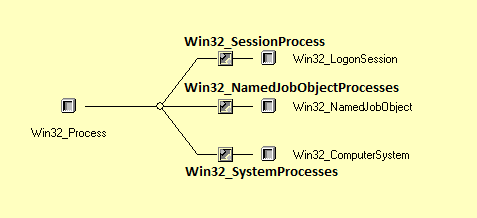
That is very cryptic for beginners like you and me. So, let us look at an example to understand this.

If you look at the above diagram (captured from the associations tab of Win32_Process in CIM Studio) and as I showed you in my earlier post, Win32_SessionProcess, in32_NamedJobObjectProcesses, Win32_SystemProcesses are the associator or association classes. Whereas, Win32_Process, Win32_LogonSession, Win32_NamedObject, and Win32_ComputerSystem are the associated classes.

Read more