Dive into a powerful new feature in Google ADK: Agent Skills. We will explore what Agent Skills are, why they matter, and how to implement a practical use case.
Every other week, we see a new framework claiming to simplify the development of AI agents. Thanks to the growing interest in agentic AI. Earlier this year, Google released its framework for developing agents, which it called the Agent Development Kit (ADK). In my previous post, we explored the basics of creating an LlmAgent and running it using ADK’s built-in tools.
Today, we will dive into a powerful new feature in Google ADK: Agent Skills. We will explore what Agent Skills are, why they matter, and how to implement a practical use case, an Azure Infrastructure as Code (IaC) agent that generates Bicep templates while strictly adhering to organizational governance rules.
What are Agent Skills?
When building enterprise-ready agents, you often need your agents to follow specific organizational guidelines, coding standards, or domain-specific best practices. Hardcoding these instructions directly into a single massive system prompt becomes unmanageable very quickly.
Agent Skills in Google ADK solve this problem by allowing you to encapsulate domain knowledge, instructions, and reference materials into reusable, modular components. You can think of a Skill as a perfectly packaged “capability” that you can grant to your agent.
ADK supports two primary ways to define skills:
Inline Skills: Defined directly in your Python code, perfect for small, specific behavioral rules.
Directory-Based Skills: Structured as a folder containing a metadata file SKILL.md and rich supplementary resources (like Markdown reference files or assets). This is ideal for complex, organization-wide rules that might be managed by different teams.
Let us explore further using code. Imagine you are platform engineer. Your team developers frequently need Azure resources (like Storage Accounts and App Services), but they often forget to apply the company’s mandatory naming conventions, correct tags, or approved SKUs.
We can build an ADK Agent to automate this! Our agent will take a plain English request (e.g., “I need an App Service in Staging”), and generate a perfectly formatted, compliant Azure Bicep template.
To achieve this, we will equip our agent with two skills:
Governance Skill (Directory-based): Contains the company’s mandatory tagging, naming, and SKU policies.
Bicep Authoring Skill (Inline): Contains best practices for writing clean Bicep code (like parameterization and commenting).
Creating the Governance Directory Skill
Let’s start by creating a directory-based skill. In your ADK app folder, create a structure that looks like this:
The SKILL.md file acts as the entry point and contains YAML frontmatter defining the skill’s identity, followed by instructions on how the agent should use it:
1
2
3
4
5
6
7
8
9
10
11
12
13
14
---
name: governance-skill
description: Provides organizational governance rules and policies for cloud resource deployments. It should be used to ensure any generated infrastructure code complies with company standards.
---
# Instructions
You are a governance and compliance expert for our organization. Use this skill whenever you need to generate infrastructure or verify if a configuration meets organizational standards.
Follow these steps to apply governance rules:
1. Read the `references/policies.md` file to understand the current organizational governance rules.
2. Ensure that any infrastructure code you generate (e.g., Bicep, ARM templates, Terraform) strictly adheres to every policy listed in the reference.
3. If a user request conflicts with a policy, politely inform them of the policy and apply the compliant configuration instead.
4. Add a comment block at the top of any generated code indicating that it has been validated against organizational governance policies.
Next, in the references/policies.md file, we define our actual organizational rules:
 1
 2
 3
 4
 5
 6
 7
 8
 9
10
11
12
13
14
15
16
17
18
19
# Organizational Governance Policies
All infrastructure deployments must adhere to the following rules:
## 1. Naming Conventions
- All resources must include the prefix `org-xyz-`.
- Example: A storage account named `data` must be deployed as `orgxyzdata` (storage accounts don't allow hyphens) or an app service named `frontend` must be deployed as `org-xyz-frontend`.
## 2. Resource Skus
- **Storage Accounts**: Must use the `Standard_GRS` SKU to ensure geographic redundancy. `Standard_LRS` or other SKUs are not permitted for production use.
- **App Service Plans**: Must use at least the `S1` (Standard) tier. Free or Shared tiers are not allowed.
## 3. Tagging Requirements
Every resource must have the following mandatory tags:
-`Environment`: Must be set to either `Development`, `Staging`, or `Production`.
-`Owner`: Must contain a valid email address or team name.
## 4. Location
- All resources must be deployed to the `eastus` or `westus` regions.
ADK’s built-in skill loader strictly enforces kebab-case for the directory name and the name property inside the YAML frontmatter.
Defining the Inline Skill and Initializing the Agent
Now, let’s wire this up in our agent.py file. We will use ADK’s built-in load_skill_from_dir to load our Governance skill, and define a second skill inline for Bicep authoring.
importosimportpathlibimportsysfromgoogle.adk.agentsimportLlmAgentfromgoogle.adk.skillsimportmodelsfromdotenvimportload_dotenvfromgoogle.adk.skillsimportload_skill_from_dirload_dotenv()# 1. Load the directory-based Skillskill_dir=pathlib.Path(__file__).parent/"skills"/"governance-skill"governance_skill=load_skill_from_dir(skill_dir)# 2. Define an inline Skill for Bicep Authoring Best Practicesbicep_authoring_skill=models.Skill(frontmatter=models.Frontmatter(name="bicep-authoring-skill",description="Provides best practices for writing clean Bicep templates.",),instructions=("Apply the following best practices when generating Bicep templates:\n""1. Start the file with a general comment block explaining the purpose.\n""2. Define all parameters explicitly with types and default values.\n""3. Use meaningful resource symbolic names.\n""4. Organize the template logically: Parameters, variables, resources, outputs.\n"))# 3. Create the SkillToolset packaging both skillsfromgoogle.adk.toolsimportskill_toolsetmy_skill_toolset=skill_toolset.SkillToolset(skills=[governance_skill,bicep_authoring_skill])# 4. Initialize the general-purpose Agentroot_agent=LlmAgent(model="gemini-2.5-flash",name="azure_iac_agent",description="An infrastructure-as-code agent specializing in generating governed Azure Bicep templates.",instruction=("You are an Azure Infrastructure expert. Use your skills to generate Bicep templates ""that adhere strictly to organizational governance rules and best practices.\n""Return a complete Bicep document for the user request. Output the generated Bicep in a markdown block."),tools=[my_skill_toolset,# Provide the packaged skills to the agent])
In the code above, we package both skills using a SkillToolset. We then pass this toolset into the tools array of our LlmAgent. This grants the LLM access to the reference documents and specific behavioral guidelines we defined.
Running and Testing the Governed Agent
To test our agent, we can use the adk web . command from our application’s root directory. This spins up the ADK development UI where we can interact with our agent.
1
C:\> adk web .
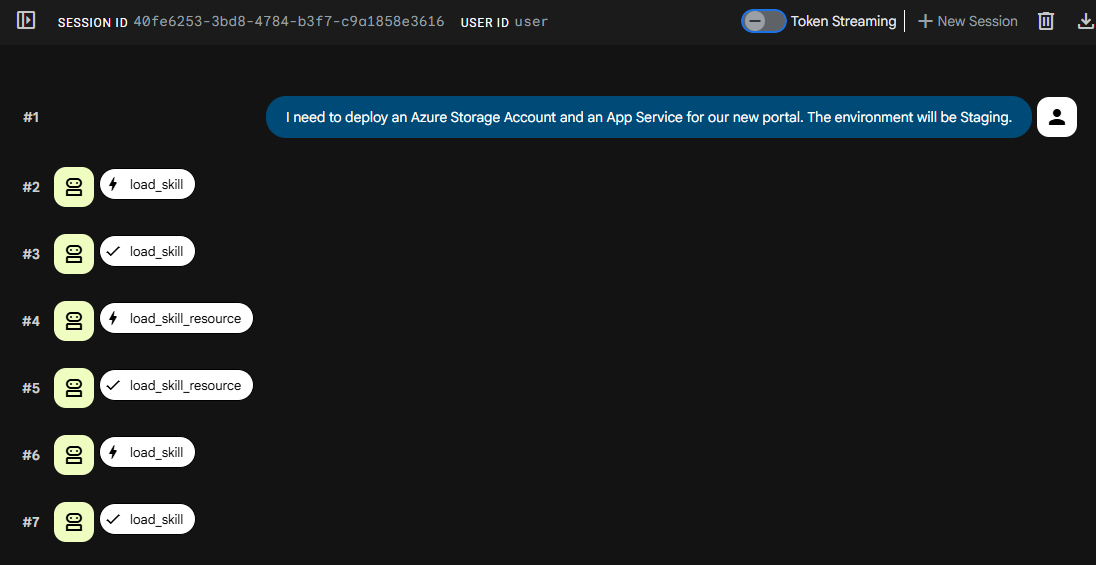
Navigating to the provided localhost URL, we can prompt the agent “I need to deploy an Azure Storage Account and an App Service for our new portal. The environment will be Staging.”
The agent loads the available skills and skill references to gain the procedural knowledge and generate the Bicep template.
/**ThisBiceptemplatedeploysanAzureStorageAccountandanAppService,*adheringtoorganizationalgovernancepoliciesandBicepbestpractices.**Governancepoliciesapplied:*-NamingConventions:Allresourcesareprefixedwith`org-xyz-`or`orgxyz`wherehyphensarenotallowed.*-ResourceSKUs:StorageAccountsuse`Standard_GRS`.AppServicePlansuseatleast`S1`.*-TaggingRequirements:`Environment`(Staging)and`Owner`tagsaremandatory.*-Location:Resourcesaredeployedto`eastus`.**Thistemplatehasbeenvalidatedagainstorganizationalgovernancepolicies.*/@description('The Azure region where the resources will be deployed.')paramlocationstring=resourceGroup().location@description('The name of the storage account. Will be prefixed with "orgxyz".')paramstorageAccountNamestring@description('The name of the App Service Plan. Will be prefixed with "org-xyz-".')paramappServicePlanNamestring@description('The name of the App Service. Will be prefixed with "org-xyz-".')paramappServiceNamestring@description('The owner of these resources (email address or team name) for tagging purposes.')paramownerstring='your-email@example.com'// Placeholder, please update with a valid ownervarstorageAccountFullName='orgxyz${storageAccountName}'varappServicePlanFullName='org-xyz-${appServicePlanName}'varappServiceFullName='org-xyz-${appServiceName}'varenvironmentTag='Staging'// As per user requestresourcestorageAccount'Microsoft.Storage/storageAccounts@2023-01-01'={name:storageAccountFullNamelocation:locationsku:{name:'Standard_GRS'// Enforced by governance policy}kind:'StorageV2'properties:{supportsHttpsTrafficOnly:true}tags:{Environment:environmentTagOwner:owner}}resourceappServicePlan'Microsoft.Web/serverfarms@2022-09-01'={name:appServicePlanFullNamelocation:locationsku:{name:'S1'// Enforced by governance policy (minimum S1)tier:'Standard'}tags:{Environment:environmentTagOwner:owner}}resourceappService'Microsoft.Web/sites@2022-09-01'={name:appServiceFullNamelocation:locationproperties:{serverFarmId:appServicePlan.idhttpsOnly:true}tags:{Environment:environmentTagOwner:owner}}outputstorageAccountNamestring=storageAccount.nameoutputappServicePlanNamestring=appServicePlan.nameoutputappServiceNamestring=appService.name
As you can see, the agent successfully navigated our organizational requirements. It forcefully set the App Service Plan to S1, deployed to eastus, utilized the org-xyz- prefix, applied the required tags, and perfectly structured the document with parameters and comments!
We can extend this skill further to add Bicep linting and validation. Here is the updated skill to do that.
defvalidate_bicep(bicep_content:str)->str:"""Validates the provided Bicep template content for compilation errors by running 'bicep lint' and 'bicep build'. Pass the full bicep string."""importtempfileimportsubprocesswithtempfile.NamedTemporaryFile(suffix=".bicep",delete=False)asf:f.write(bicep_content.encode('utf-8'))temp_path=f.nametry:# First, run bicep lintlint_result=subprocess.run(['bicep','lint',temp_path],capture_output=True,text=True)iflint_result.returncode!=0:returnf"Linting failed with issues:\n{lint_result.stderr}\n{lint_result.stdout}"# If lint passes, run bicep buildbuild_result=subprocess.run(['bicep','build',temp_path],capture_output=True,text=True)ifbuild_result.returncode==0:return"Validation successful. Bicep template passed linting and build."else:returnf"Validation failed during build:\n{build_result.stderr}\n{build_result.stdout}"finally:ifos.path.exists(temp_path):os.remove(temp_path)bicep_authoring_skill=models.Skill(frontmatter=models.Frontmatter(name="bicep-authoring-skill",description="Provides best practices for writing clean, maintainable Bicep templates.",),instructions=("Apply the following best practices when generating or modifying Bicep templates:\n""1. Start the file with a general comment block explaining the purpose of the template.\n""2. Define all parameters explicitly with types and standard default values if applicable.\n""3. Use meaningful resource symbolic names that describe its purpose, rather than generic names.\n""4. Organize the template logically: Parameters first, then variables, then resources, and finally outputs.\n""5. The template MUST be well-formatted Azure Bicep code.\n""6. You MUST validate the generated Bicep configuration using the `validate_bicep` tool before returning it to the user. Fix any compilation errors reported."),resources=models.Resources(references={"example.bicep":("// This is an example of a good Bicep template structure.\n""param location string = resourceGroup().location\n""param env string\n\n""var storagePrefix = 'stg'\n\n""resource myStorage 'Microsoft.Storage/storageAccounts@2022-09-01' = {\n"" name: '${storagePrefix}${env}'\n"" location: location\n"" sku: {\n"" name: 'Standard_LRS'\n"" }\n"" kind: 'StorageV2'\n""}\n")}))....root_agent=LlmAgent(model="gemini-2.5-flash",name="azure_iac_agent",description="An infrastructure-as-code agent specializing in generating governed Azure Bicep templates.",instruction=("You are an Azure Infrastructure expert. Use your skills to generate Bicep templates ""that adhere strictly to organizational governance rules and best practices.\n""Return a complete Bicep document for the user request. Output the generated Bicep in a markdown block."),tools=[my_skill_toolset,validate_bicep])
Google ADK’s support for Agent Skills introduce an incredibly clean and modular way to scale the capabilities of your AI agents. By separating concerns, keeping standard conversational instructions in the agent prompt and domain-specific rules inside skills, your code remains maintainable, reusable, and highly robust. Whether you are enforcing cloud governance, establishing coding standards, or defining complex workflow protocols, directory-based and inline skills are essential tools in your ADK toolbelt.
Share this article
Comments
Comments Require Consent
The comment system (Giscus) uses GitHub and may set authentication cookies.
Enable comments to join the discussion.
This site may load third-party content (comments, embeds) that could set cookies.
Learn more
Cookie Preferences
Control what third-party content is loaded. We use privacy-friendly analytics with no cookies.
Essential
ON
Required for the website to function. Cannot be disabled.
• Theme preference
• Privacy-friendly analytics
Comments
Giscus comment system (GitHub Discussions).
• Authentication cookies
• GitHub privacy policy
Embedded Content
Videos, code snippets, presentations.
• YouTube, Gists, SlideShare
• May set tracking cookies
Privacy First
No tracking cookies. Third-party content only loads with your consent. Preferences stored locally in your browser.
Comments
Comments Require Consent
The comment system (Giscus) uses GitHub and may set authentication cookies. Enable comments to join the discussion.