Docker cagent - An introduction
Docker is one company that has been really taking advantage of the AI wave. True to its philosophy, it is helping developers with new tools and frameworks to simplify AI application development. Starting with Docker MCP catalog, MCP toolkit, Model Runner, MCP gateway, and cagent, Docker is certainly at the forefront of AI agent developer experience. In this article, we will get started with cagent.
Introduction
Docker cagent is an open-source, multi-agent AI runtime that lets you build, orchestrate, and share teams of specialized AI agents defined declaratively in YAML. Instead of wiring together complex agent frameworks in code, you describe what each agent does, which tools it can access, and how agents delegate to one another. cagent handles the rest: model communication, tool orchestration, context isolation, and inter-agent coordination. It ships bundled with Docker Desktop 4.49+ and can distribute agent configurations as OCI artifacts through Docker Hub, treating agents with the same rigor as container images. Written in Go and currently labeled experimental, cagent represents Docker’s bet that the agent ecosystem needs the same standardization, portability, and trust infrastructure that containers brought to application deployment.
With the evolution of various agent frameworks, we are moving from a simple request-response pattern for implementing monolithic agents to orchestrating specialized agents. cagent helps simplify this transition with its declarative approach.
cagent sits at the top of Docker’s AI stack. Docker Model Runner (DMR) provides local inference with no API keys. The MCP Gateway orchestrates external tools in isolated containers. The MCP Catalog offers curated tool servers on Docker Hub. cagent ties these layers together. It uses DMR for local models, routes tool calls through the MCP Gateway, and packages agent configurations as OCI artifacts for distribution. If Docker containers standardized how applications ship, cagent aims to standardize how AI agents ship.
Architecture
cagent’s architecture centers on a few core concepts that govern how agents are defined, how they communicate, and how they access tools. Every agent configuration has a root agent, which is the entry point that receives user messages. The root agent can work alone or coordinate a team through two delegation mechanisms.
Sub-agents
Sub-agents implement hierarchical task delegation. A parent agent assigns a specific task to a child agent using an auto-generated transfer_task tool. The child agent executes in its own isolated context. Each child agent has its own model, instructions, and toolset and returns results to the parent. The parent retains control and can delegate to multiple sub-agents in a sequence or combine their outputs. Sub-agents can have sub-agents themselves, enabling arbitrarily deep hierarchies.
Handoffs
The handoff mechanism implements peer-to-peer conversation transfer. When an agent encounters a topic outside its expertise, it hands the entire conversation to a more suitable peer using the transfer_to_agent tool. The receiving agent takes over completely. This pattern works well for routing conversations between domain experts without a central coordinator.
Each agent maintains its own conversation context. When a root agent delegates to a sub-agent, the sub-agent receives only the specific task description, not the parent’s full conversation history. This isolation keeps contexts focused and prevents token-bloat in deep hierarchies.
Getting started
Docker Desktop 4.49+ includes cagent integration. After updating Docker Desktop, verify with:
|
|
You can also install cagent using the standalone binary available on the GitHub releases page.
cagent supports models from Anthropic, Gemini, and OpenAI. For managed model providers, it is important to supply the API keys as environment variables.
|
|
cagent also supports local models run using Docker Model Runner and an OpenAI-compatible endpoint.
Basic agent
cagent uses a YAML configuration file for defining the agentic application. The YAML skeleton structure is as shown below.
|
|
The “2” schema version is the current standard and is shipped with Docker Desktop 4.49+. Older files without a version field are treated as v1 and remain backward-compatible. The v2 schema supports the full feature set, including RAG, structured output, thinking budgets, and advanced delegation.
We will dive into configuration options as we progress in this walk-through. Let us start with a basic agent.
|
|
This basic agent uses a simple configuration and uses openai/gpt-4o for the model. You can run this agent using the cagent exec command.
|
|
cagent exec takes a prompt and generates a response. If you prefer a conversational interface, you can use the cagent run command. This command opens a simple yet beautiful TUI.
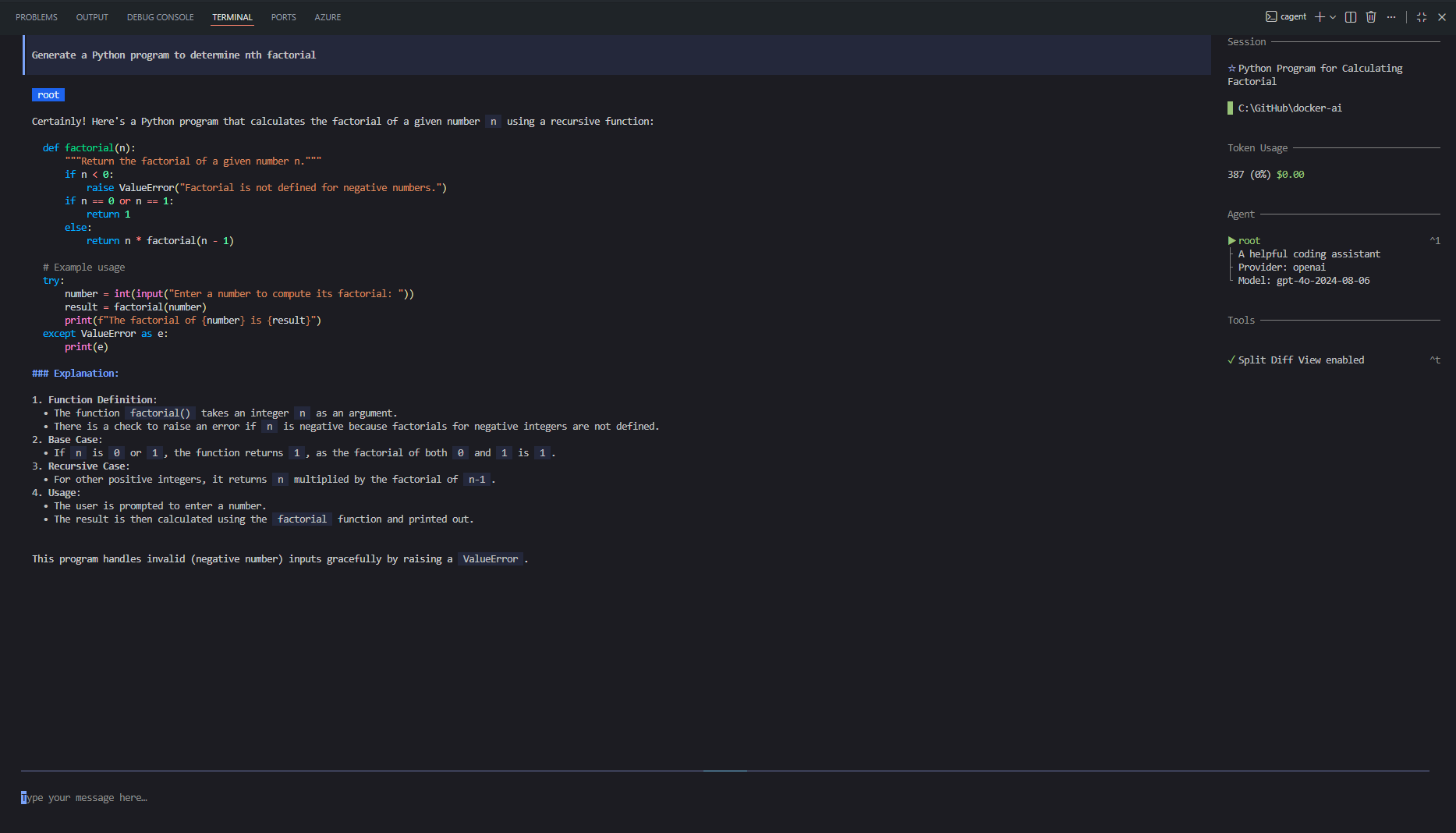
Let us try the same with a local model run using DMR.
|
|
In this example, we use the models object from the configuration to define the agent’s model configuration. local-gemma is the model configuration name we can reference in the agent configuration. If you are running this on a Windows system, ensure you also provide the base_url. By default, cagent tries to connect to a local socket for the model endpoint. This configuration can be run the same way we did earlier. The other supported model fields in the model configuration include provider, model, max_tokens, temperature, top_p, frequency_penalty, presence_penalty, base_url (for custom endpoints), token_key, parallel_tool_calls, and provider_opts for provider-specific settings. Alloy models let you rotate between multiple models by separating names with commas in the model field.
The model specification we saw in the first example is the inline shorthand specification. The prefix in the model name, such as openai or dmr, is used to route to the appropriate provider. model: auto lets cagent auto-select a provider based on available API keys.
A simple multi-agent
Now that we have a basic agent working, let us explore the real power of cagent. In this example, we will build a small team: a coordinator agent that delegates research to a researcher and writing to a writer. Each agent has its own model, instructions, and tools.
|
|
There are a few important things to observe in this configuration. The root agent is always the entry point. It is the only agent that interacts directly with the user. The sub_agents field lists the agents that the root agent can delegate tasks to. Each sub-agent has its own model, description, and instruction. The description field is particularly important in multi-agent setups since cagent uses it to help the parent agent decide which sub-agent to call and what task to assign.
Notice how we are using gpt-4o for the coordinator (which needs to understand complex instructions and make delegation decisions) and the cheaper gpt-4o-mini for the researcher and writer (which handles more focused, well-defined tasks). This is a practical cost-optimization pattern: use your most capable model where judgment matters, and cheaper models where the task is well scoped.
Let us run this agent and see how it works.
|
|
When you run this, you will see the delegation in action. cagent clearly labels which agent is active at each step. The root agent interprets the user request, delegates research to the researcher, receives findings, and then hands those findings to the writer for polishing.
There is also an alternative delegation mechanism called handoffs. Unlike sub-agents, where the parent retains control, a handoff transfers the entire conversation to another agent. This is useful when you want domain experts to take over completely.
|
|
The key difference: sub_agents uses a transfer_task tool in which the parent assigns a specific task and receives the results. handoffs uses a transfer_to_agent tool where the conversation moves entirely to the new agent. Think of sub-agents as a manager delegating work and handoffs as a receptionist routing you to the right department.
This article covered the foundations, how cagent’s architecture works with sub-agents and handoffs, and how to get started with basic and multi-agent configurations. But we have barely scratched the surface of what cagent can do. In the next parts of the series, we will dive into using tools and MCP, RAG with cagent, evaluating and sharing agents, and, finally, a complex multi-agent workflow that brings together all the learnings.
Comments
Comments Require Consent
The comment system (Giscus) uses GitHub and may set authentication cookies. Enable comments to join the discussion.