A model is a text completion machine. It has no hands, eyes, or memory. The harness is what gives it the ability to act and remember.
For a moment, imagine all you have is a Large Language Model (LLM) with no chat window. All you are allowed to do is send a REST API call or the client SDK a model provider offers. When you do this, the model receives the text input and generates text output. It can generate text, but it cannot act. It can think and reason, but it cannot read from or write to your local files. Then it forgets everything it ever received and its response, and waits to be called again. This isn’t enough if you want to achieve anything useful with an LLM. This is where an agent harness comes into play. The agent harness is what makes it observe, remember, and act.
In this series on agent harnesses, we shall understand the basics of a harness, explore different open-source harnesses, and eventually look at building one ourselves. In today’s article, let us look at why we need a harness.
A model alone isn’t enough
I had already mentioned that a model alone is just a text-completion machine. If you give it a prompt, it uses its trained weights to guess the next word and picks the one with the highest probability. I know. I oversimplified it, but that is the gist. To better understand this, let us use a primitive harness I built.
First, we will ask the model to generate a simple Python program to find if a number is prime.
1
2
3
4
5
6
7
8
9
$ python ask-model.py "Generate a <10 line python program to find if a number is prime."Here’s a compact script (7 lines) that checks whether an entered number is prime:
def is_prime(n):
if n < 2: return False
for i in range(2, int(n**0.5) + 1):
if n % i== 0: return False
return True
num= int(input("Enter a number: ")) print(f"{num} is {'prime' if is_prime(num) else 'not prime'}")
This is great. But, it is not locally stored. So, let us ask the model to do that.
1
2
3
4
5
6
7
8
9
$ python ask-model.py "Generate a <10 line python program to find if a number is prime and save it as prime.py."prime.py
#!/usr/bin/env python3 import sys
def is_prime(n):
return n > 1 and all(n % i for i in range(2, int(n**0.5) + 1))if__name__=="__main__":
n= int(sys.argv[1])if len(sys.argv) > 1else int(input("Enter number: ")) print(f"{n} is {'prime' if is_prime(n) else 'not prime'}")
Model generates prime.py. Let us check whether the prime.py local folder exists.
It does not. Because the model alone isn’t enough. We need to give it tools to take action. In our primitive harness, we already have a write_file tool. Let us give the tool to the model and see what happens. For this, we need to pass the --tools flag.
$ python ask-model.py "Generate a <10 line python program to find if a number is prime and save it as prime.py." --tools
write_file path=prime.py content=<229 chars>
def is_prime(n):
if n < 2: return False
for i in range(2, int(n**0.5) + 1):
if n % i== 0: return False
return True
... 3 more lines
run it? [y]es / [N]o / [a]ll: y
[write_file path=prime.py content=<229 chars> -> wrote prime.py, 229 characters]Here is a compact Python script (under 10 lines) that checks whether a given number is prime. The file prime.py has been created in the current directory.
def is_prime(n):
if n < 2: return False
for i in range(2, int(n**0.5) + 1):
if n % i== 0: return False
return True
n= int(input("Enter number: ")) print(f"{n} is {'prime' if is_prime(n) else 'not prime'}")You can run it with:
python prime.py
$ dir
Directory: C:\GitHub\agent-harness\harness-textbook\scripts
Mode LastWriteTime Length Name
---- ------------- ------ ----
d----- 23-08-2026 19:41 __pycache__
-a---- 23-08-2026 19:41 21759 ask-model.py
-a---- 23-08-2026 19:46 223 prime.py
There you go. We have the prime.py program in the local folder. With this, our model is now capable of not just generating text but also using tools such as write_file. Not only that, you get prompted to allow the use of write_file tool.
The LLMs are capable of not just generating text but also of thinking and reasoning about a given task. We can specify --think low|medium|high to enable reasoning. This helps in handling planning for complex tasks.
$ python ask-model.py "What needs to be done to prime.py to make it scale to discover the largest prime? Write the detailed plan to plan.md file." --think medium --tools
Reasoning
The user asks: "What needs to be done to prime.py to make it scale to discover the largest prime? Write the detailed plan to plan.md file." So they want a detailed plan written to a file plan.md. We need to produce a plan about modificationsto prime.py to make it scalable to discover large primes. Likely include algorithmic improvements (e.g., using probabilistic primality tests like Miller-Rabin), optimized data structures, parallelization, using efficient libraries (gmpy2), using segmented sieve, etc. Also code organization, using multiprocessing, possibly GPU. Provide steps.
We need to write file plan.md. So we should use the write_file tool. Let's prepare content.
[write_file path=plan.md content=<5,059 chars> -> wrote plan.md, 5,059 characters]The detailed plan has been written to plan.md. Let me know if you’d like any further modifications or additional
documentation!
$ dir
Directory: C:\GitHub\agent-harness\harness-textbook\scripts
Mode LastWriteTime Length Name
---- ------------- ------ ----
d----- 23-08-2026 19:41 __pycache__
-a---- 23-08-2026 19:41 21759 ask-model.py
-a---- 23-08-2026 20:32 5137 plan.md
-a---- 23-08-2026 19:46 237 prime.py
With this, our primitive harness can leverage the model’s capabilities to generate plan for complex tasks. Great! Let us now understand if our models remembers anything about what we have done so far.
1
2
3
4
5
6
$ python ask-model.py "Summarize the plan you created in a few words." --think medium
Reasoning
The user asks: "Summarize the plan you created in a few words." They presumably refer to a plan previously created in conversation. However, there is no earlier context. Perhaps they want a generic short summary, like "Identify gaps, set objectives, develop curriculum, implement, assess." Provide a concise phrase. Let's respond with a brief summary.
Answer
Identify gaps → set objectives → design curriculum → deliver training → assess & refine
Clearly, the model does not remember anything. Of course, it won’t. An LLM, by design, is stateless. Between two calls, the model remembers nothing. Not your name, not the file you were editing, not what it said thirty seconds ago. The illusion of memory in a chat interface is implemented by sending the entire conversation back each time. Something has to do that resending. That something is not the model.
The harness we have been using provides the necessary support to add that memory to the context. Let us use that and see if we can help the model remember. We can use the --memory flag to store the session state and reload it during every conversation.
1
2
3
4
5
6
7
8
9
10
11
12
13
14
15
16
$ python ask-model.py "We generated a plan to update prime.py to scale to find the largest prime. The plan is in plan.md. Understand the plan." --think medium --tools --memory session1.json
Reasoning
We need to read plan.md.
[read_file path=plan.md -> 5,059 chars]Reasoning
We need to understand the plan. The user says: "We generated a plan to update prime.py to scale to find the largest prime. The plan is in plan.md. Understand theplan."We need to respond with a summary and comprehension, maybe ask clarifying questions. Provide a concise understanding.
Answer
Got it — the Markdown file lays out a clear roadmap for turning the current, likely‑tiny prime.py into a production‑grade prime‑search engine that can tackle very
large candidates (millions of digits or high‑bit‑length numbers). Here’s a distilled version of what the plan covers:
...
This gives the model the memory it needs. The session memory is now stored in session1.json. When we prompt the model next, we provide this memory as the context.
1
2
3
4
5
6
7
8
9
10
11
12
$ python ask-model.py "What is the first step in our plan?." --think medium --tools --memory .\session1.json --load-memory .\session1.json
Reasoning
We need to answer: "What is the first step in our plan?" According to the plan.md, Section 1 is "Current Situation Assessment". So the first step is to understand the existing `prime.py`: identify algorithm, input limits, bottlenecks, memory usage, check for modular structure. So answer that.

Answer
The very first step is “Current Situation Assessment.”
That means you start by examining the existing prime.py to:
 1 Identify which algorithm it currently uses (e.g., trial division or another simple test).
 2 Determine its input limits, performance bottlenecks, and memory consumption.
 3 Look for any existing modular structure (functions, classes, separate files) that can be extended later.

Only after you have a clear picture of the current script do you move on to defining scalability goals and the rest of the plan.
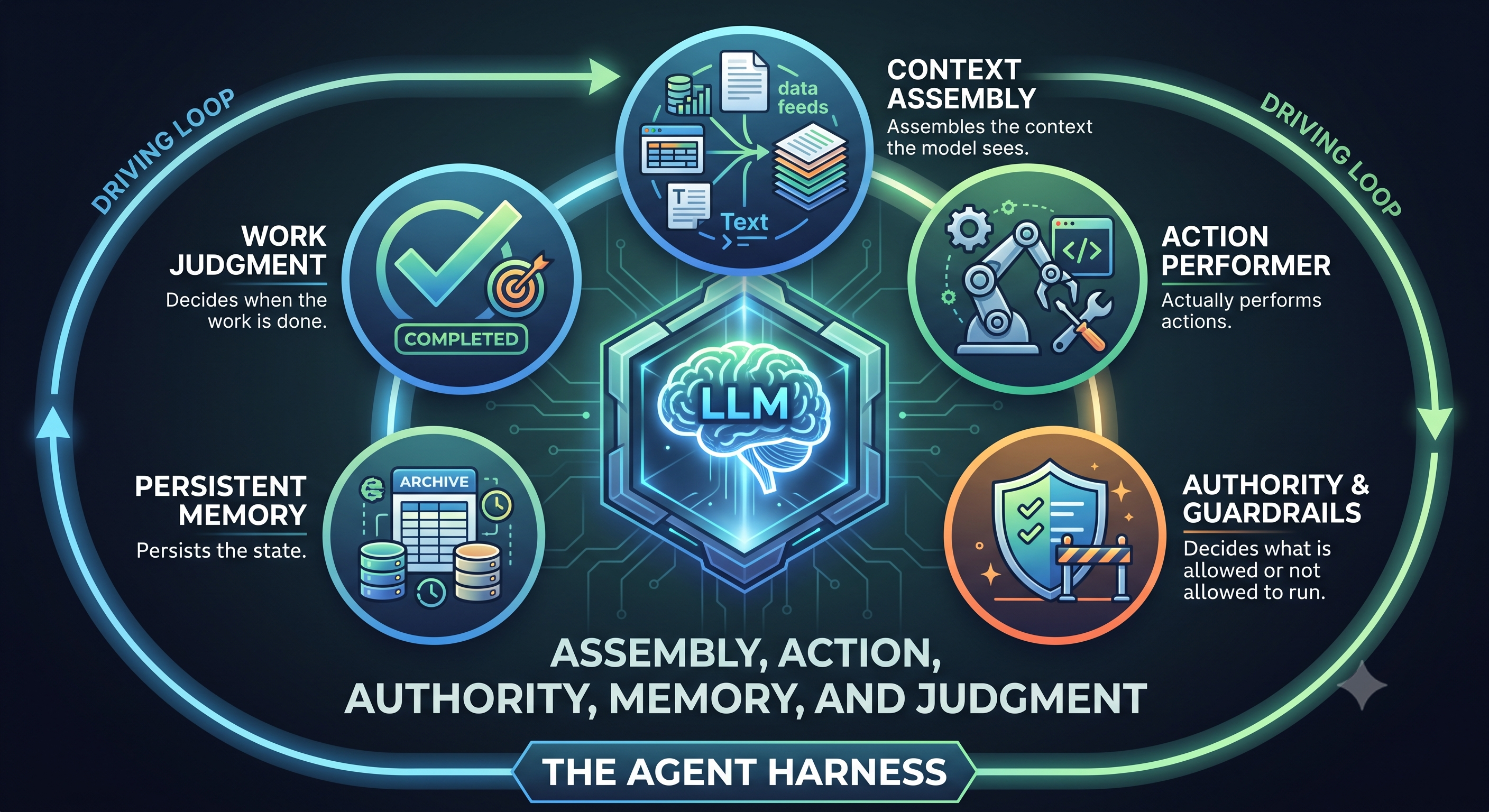
If we walk through the examples so far, we started with a model that is stateless, handless, and blind and enhanced it to add the following:
Something that assembles the context the model sees.
Something that actually performs actions.
Something that decides what is allowed or not allowed to run.
Something that persists the state.
Something that decides when the work is done.
Image Credit: Gemini
Assembly, action, authority, memory, and judgment. Those five plus the loop that drives them are the harness. Without a harness, a model is like a car engine with no chassis and a driver to use its capability. The primitive harness I built for this demonstration isn’t good enough when you want to create a. With this knowledge, we will look at exactly what an agent harness is and dive into the six aspects a harness must implement in the next part of this series.
Share this article
Comments
Comments Require Consent
The comment system (Giscus) uses GitHub and may set authentication cookies.
Enable comments to join the discussion.
This site may load third-party content (comments, embeds) that could set cookies.
Learn more
Cookie Preferences
Control what third-party content is loaded. We use privacy-friendly analytics with no cookies.
Essential
ON
Required for the website to function. Cannot be disabled.
• Theme preference
• Privacy-friendly analytics
Comments
Giscus comment system (GitHub Discussions).
• Authentication cookies
• GitHub privacy policy
Embedded Content
Videos, code snippets, presentations.
• YouTube, Gists, SlideShare
• May set tracking cookies
Privacy First
No tracking cookies. Third-party content only loads with your consent. Preferences stored locally in your browser.
Comments
Comments Require Consent
The comment system (Giscus) uses GitHub and may set authentication cookies. Enable comments to join the discussion.